
Income & Expense Tracker

Original price was: £15.00.Current price is: £11.99.

A friendly, ready-to-use tracker for logging income and expenses — no spreadsheet skills required. Instant download, editable in Excel, Google Sheets, or Numbers.

Digital download, available immediately. By buying, including with Google Pay or Amazon Pay, you agree to immediate access and that your 14-day right to cancel ends once your download is available. See our Terms and Refund Policy.

Sole tradersSide hustlesMarket stallsOnline shopsFreelancersCraftersTutorsCleanersGardenersSmall businesses
Instant downloadLink straight after checkout and by email
Excel or Google SheetsMac, PC, Chromebook. No macros
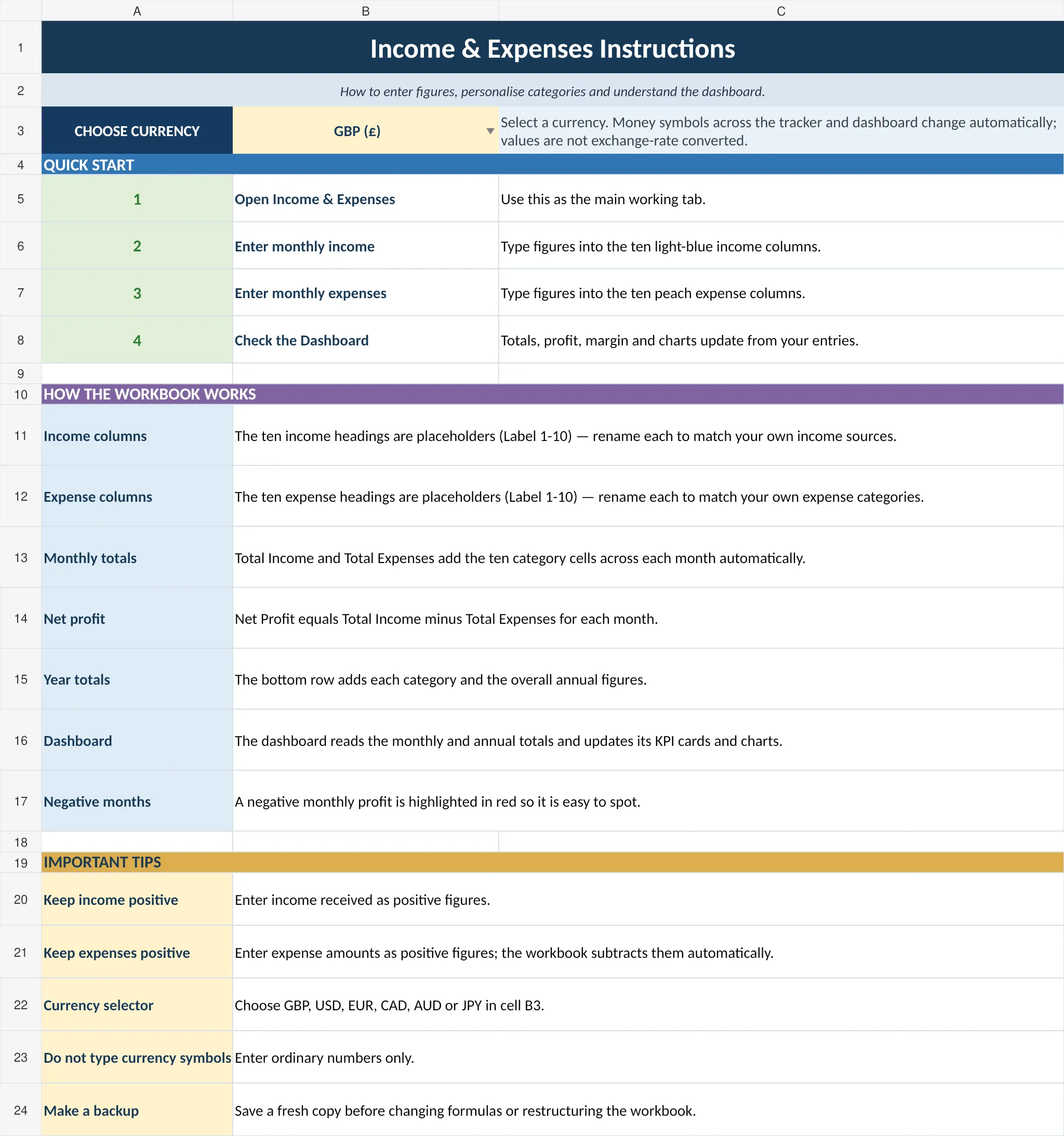
Start Here guide built inPlain-English steps for every tab
Secure checkoutCard, Apple Pay and Google Pay

Sound familiar?

Receipts in a shoebox and a tax return to fill in.

  • Income and spending scattered across bank apps and receipts
  • No idea if the side hustle actually makes money
  • Tax return time spent adding up a year
  • Categories guessed at the last minute

That’s not a you problem. It’s a missing-system problem.

Why people love it

Add a payment. The totals add themselves.

  • A monthly log for every payment in and out
  • An automatic summary of income, expenditure and net position
  • Categories so you see where the money goes
  • No formulas to write, just your figures

How it fits together

Log it once. The summary updates itself.

  1. LogDate, description, amount
  2. CategoryWhere it came from or went
  3. TotalsIncome and spending added up
  4. SummaryYour net position
  5. Tax timeTidy records, ready
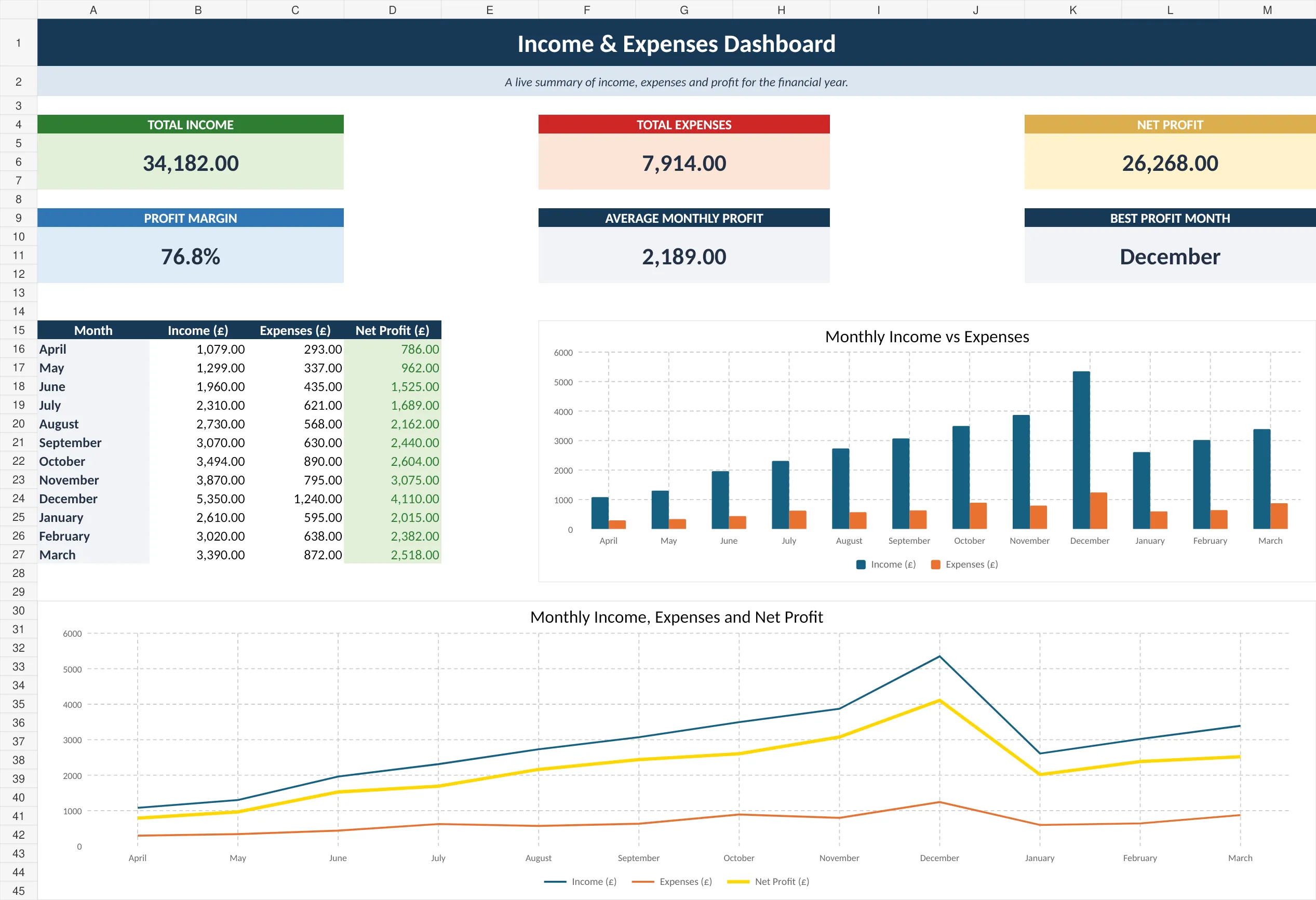
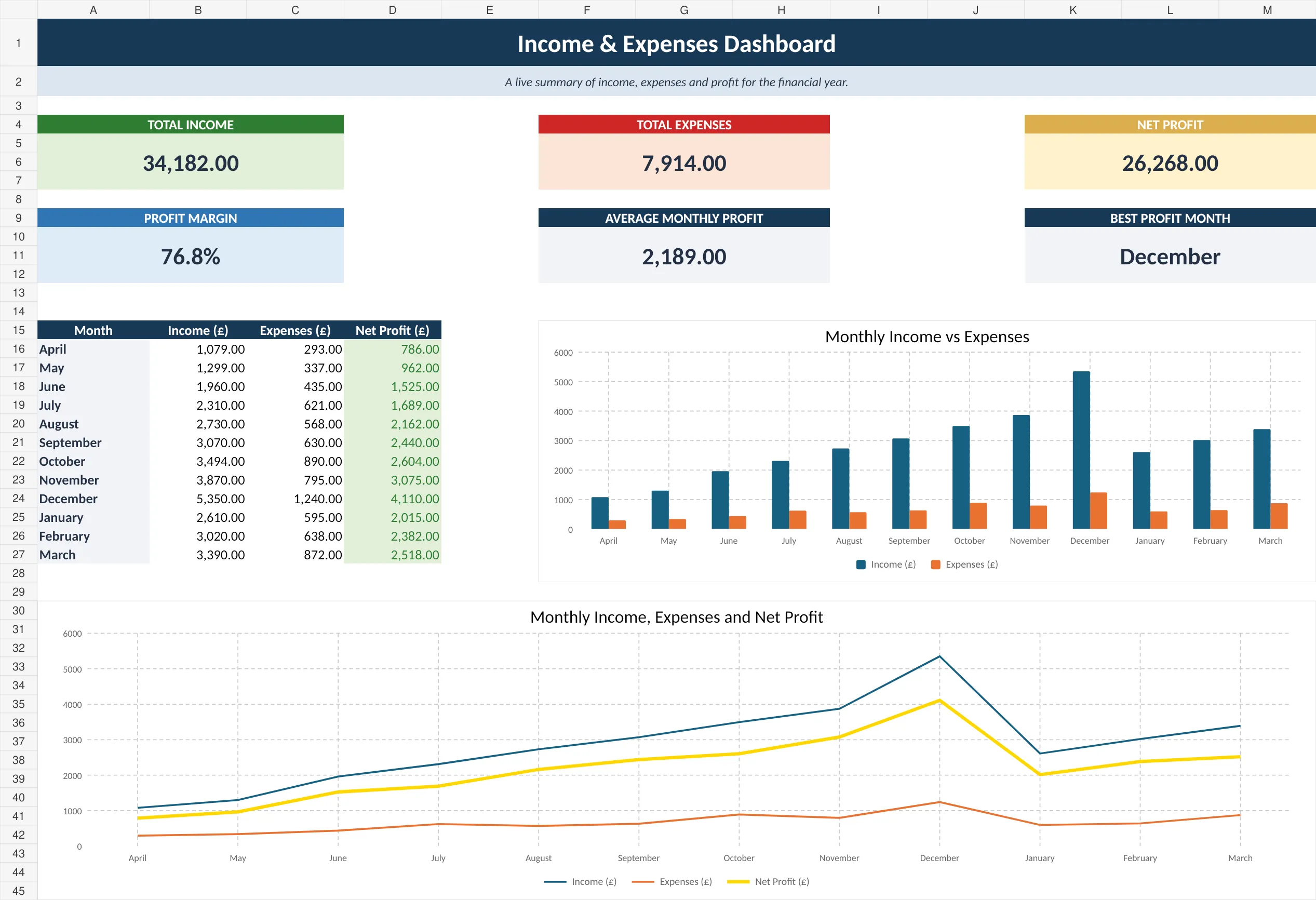
Income and expense summary dashboard

The summary

Your net position, worked out.

Income, expenditure and what’s left, totalled for you every month.

Formulas to write0Just your figures
Monthly fees£0One payment, yours to keep
Works in3 appsExcel, Sheets, Numbers
TotalsAutomaticUpdated as you go

What’s inside

Everything in one file. Click through it.

Monthly Log

Record every payment in and out with the date, a description and a category.

Before and after

From guessing to knowing.

Without it

  • Receipts in a shoebox
  • Totals added up in January
  • Guessing if it makes money

With the tracker

  • Every payment logged
  • Totals worked out monthly
  • Your net position at a glance

What you get

Everything in one download.

The trackerReady for your first entry
Automatic summaryIncome, spending, net
InstructionsPlain-English steps
No macrosA clean, safe file
Works everywhereExcel, Google Sheets or Numbers
Help if you’re stuckMessage me any time

Set up in minutes

Four steps.

  1. Buy and downloadThe link arrives straight away
  2. Open itExcel, Google Sheets or Numbers
  3. Add each paymentAs it happens, or weekly
  4. Check the summaryYour totals, worked out

Made for

  • Self-employed people and side hustles
  • Market stalls and small online shops
  • Anyone who wants tidy records for their tax return

Not for

  • Invoicing customers
  • Filing your tax return
  • VAT returns

A record-keeping spreadsheet, not accounting, tax or legal advice. It isn’t Making Tax Digital software.

Before you buy

Questions

Do I need Microsoft Excel?

No. It works in Microsoft Excel, free in Google Sheets, and in Apple Numbers.

Is it a subscription?

No. It is a one-off payment and the file is yours to keep. There are no monthly fees.

I'm not good with spreadsheets. Is this for me?

Yes. You just type into the input cells and the totals, charts and dashboard update themselves. There are no formulas to write, and the instructions in the file walk you through it.

Can I see it before I buy?

Yes. The screenshots above show the main tabs, and you are welcome to message me with any questions first.

Is it Making Tax Digital (MTD) software?

No. It is a record-keeping spreadsheet that keeps your figures organised. If Making Tax Digital for Income Tax applies to you, you will need MTD-compatible software to submit your returns to HMRC.

Does it work on a Mac, iPad or phone?

Yes. On a Mac it works in Excel for Mac, Apple Numbers or Google Sheets. On an iPad or phone you can open it in the Numbers, Excel or Google Sheets app, but a computer is easier for setting it up.

Can I get a refund?

Because it is an instant digital download, I can’t offer a refund once the file has been downloaded. If the file is faulty and I can’t fix it, you were charged twice, or you received the wrong product, I will put it right or refund you. See the Refund Policy. This doesn’t affect your statutory rights.

How do I get my file?

It is an instant digital download. You will get a download link straight after checkout, and by email.

What if I get stuck?

Message me any time and I will help you get set up.
Ready when you are

Tidy records, ready for your tax return.

£11.99 once. Download it now and log today’s takings.

Buy now, instant download

More self-employed essentials →

Full product details, tabs list and notes

Description

What’s in your download

  • Your blank spreadsheet – ready for your own details (Excel and Google Sheets)
  • A filled-in DEMO copy – the same sheet with sample data, so you can see every tab working
  • A full PDF user guide – set-up, every tab explained, a simple routine, the HMRC and UK rules that apply, troubleshooting and FAQs

Keep your finances in check with this easy-to-use tracker that categorises income and expenses, helping you see where your money goes each month.

Who This Income and Expenditure Spreadsheet Is For

This simple income and expenditure spreadsheet is made for sole traders, freelancers and anyone running a side hustle who wants a clear picture of the money coming in and going out, without paying for accounting software. It also works well as a household income and expense tracker.

  • Self-employed people who want tidy records ready for their tax return
  • Side hustles, market stalls and small online shops
  • Anyone who keeps receipts in a shoebox and wants to stop

What’s Inside

  • Monthly log – record every payment in and out with the date, a description and a category.
  • Automatic Summary tab – totals your income, your expenditure and your net position for you.
  • Categories – see at a glance where your money goes each month.
  • No formulas to write – everything is set up, so you only type in your figures.

How It Works

  1. Buy and download the file instantly.
  2. Open it in Microsoft Excel, Google Sheets or Apple Numbers.
  3. Add each payment as it happens, or catch up once a week.
  4. Check the Summary tab to see your totals and net position.

Keeping your income and expenditure up to date through the year means no last-minute panic when your tax return is due, and you will always know whether you are actually making money.

Instant digital download, delivered straight to your inbox after checkout.

Income and Expenditure Spreadsheet FAQ

Do I need Microsoft Excel?

No. It works in Microsoft Excel, free in Google Sheets, and in Apple Numbers.

Is it a subscription?

No. It is a one-off payment and the file is yours to keep. There are no monthly fees.

I’m not good with spreadsheets. Is this for me?

Yes. You just type into the input cells and the totals, charts and dashboard update themselves. There are no formulas to write, and the instructions in the file walk you through it.

Can I see it before I buy?

Yes. The screenshots above show the main tabs, and you are welcome to message me with any questions first.

Is it Making Tax Digital (MTD) software?

No. It is a record-keeping spreadsheet that keeps your figures organised. If Making Tax Digital for Income Tax applies to you, you will need MTD-compatible software to submit your returns to HMRC.

Does it work on a Mac, iPad or phone?

Yes. On a Mac it works in Excel for Mac, Apple Numbers or Google Sheets. On an iPad or phone you can open it in the Numbers, Excel or Google Sheets app, but a computer is easier for setting it up.

Can I get a refund?

Because it is an instant digital download, I can’t offer a refund once the file has been downloaded. If the file is faulty and I can’t fix it, you were charged twice, or you received the wrong product, I will put it right or refund you. See the Refund Policy. This doesn’t affect your statutory rights.

How do I get my file?

It is an instant digital download. You will get a download link straight after checkout, and by email.

What if I get stuck?

Message me any time and I will help you get set up.

Reviews

There are no reviews yet.

Only logged in customers who have purchased this product may leave a review.