Hospitality Command Centre — All-in-One Bookings, Rota & Accounts Spreadsheet for Restaurants, Bars & Pubs

£29.99

Build your hospitality bundle

Tick the sheets you want. The discount is worked out here and added in your basket automatically.

Any 3 – 15% offAny 5 – 25% off10 or more – 40% off
  • £29.99
  • £29.99
  • £29.99
  • £29.99
  • £24.99
  • £24.99
  • £24.99
  • £19.99
  • £19.99
  • £19.99
  • £19.99

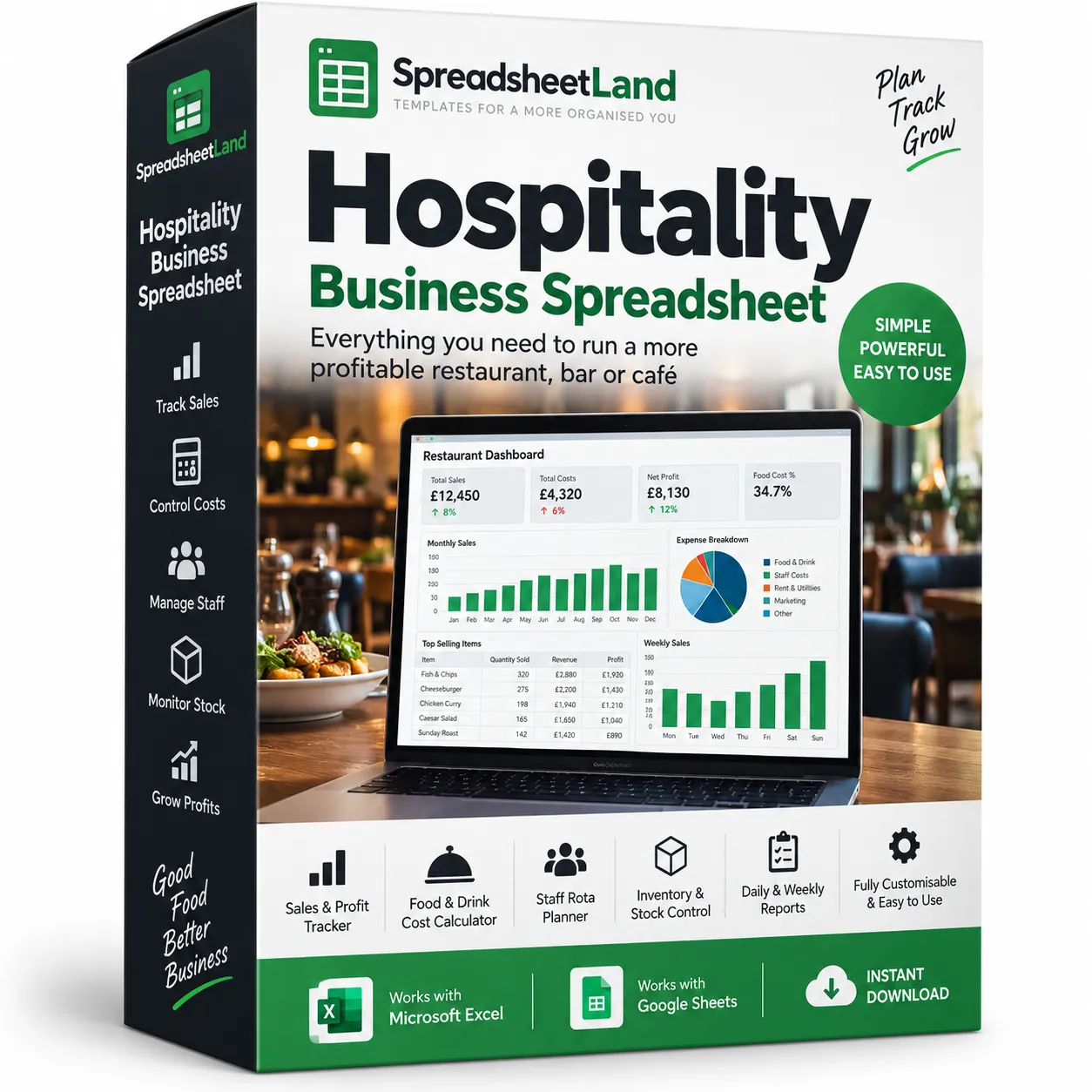
Make life easy with ONE spreadsheet. Bookings, deposits, invoices, menu costing, stock, staff rota, expenses and a live dashboard for your restaurant, bar, pub or café — all in one workbook that does the maths for you. Works in Excel & Google Sheets. No macros, no subscription. Instant download, with a fully filled-in example venue included.

Why it’s safe to buy

  • One-off price – no subscription, no monthly fees
  • Works in Excel or free Google Sheets (Mac, PC, Chromebook)
  • Instant download right after checkout, and by email
  • Comes with a filled-in example so you can see how it works
  • Stuck? Message me and I’ll help you get set up

Digital download, available immediately. By buying, including with Google Pay or Amazon Pay, you agree to immediate access and that your 14-day right to cancel ends once your download is available. See our Terms and Refund Policy.

RestaurantsPubsBarsCafésBistrosGastropubsTea roomsFunction roomsWine barsTakeaways
Instant downloadLink straight after checkout and by email
Excel or Google SheetsMac, PC, Chromebook. No macros
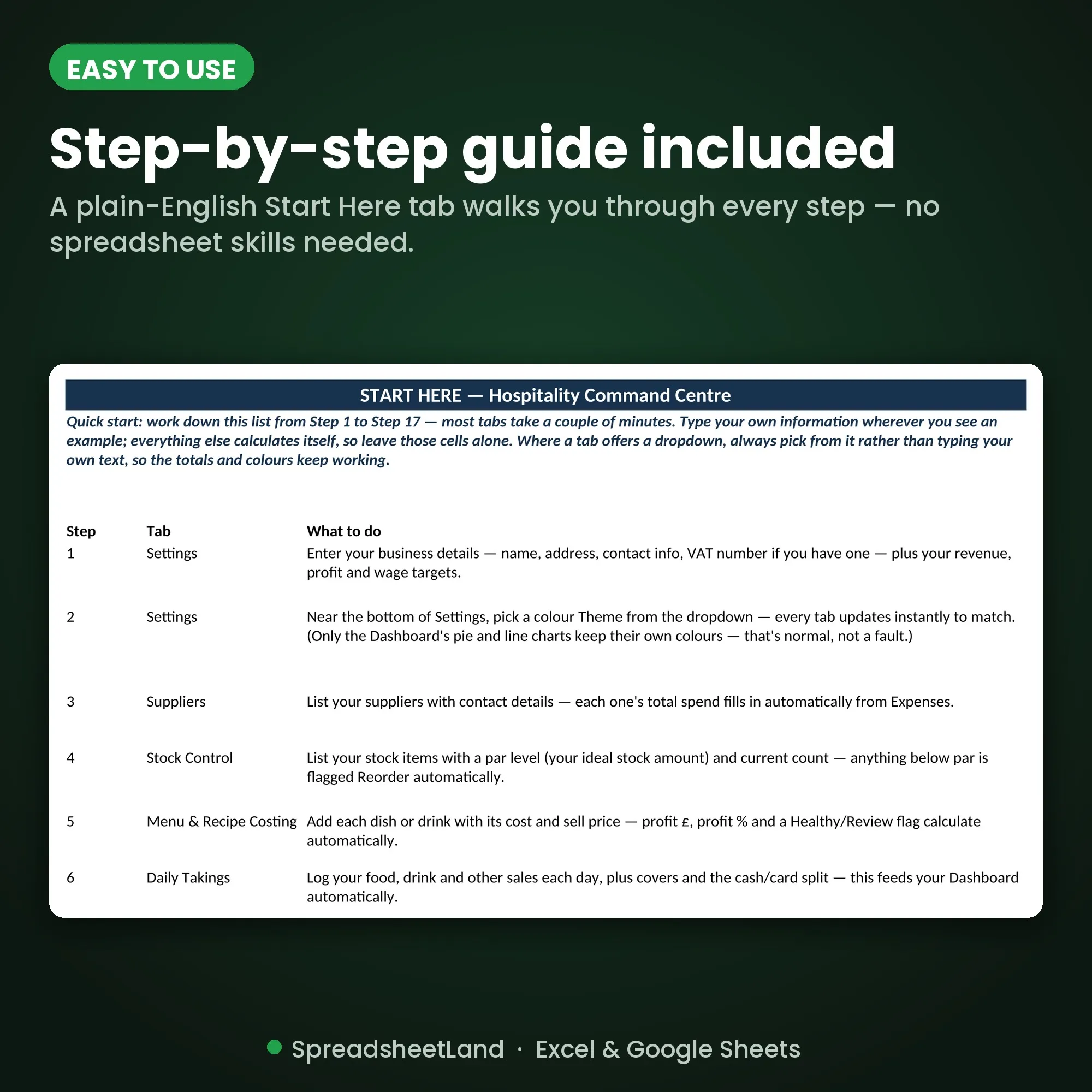
Start Here guide built inPlain-English steps for every tab
Secure checkoutCard, Apple Pay and Google Pay

Sound familiar?

Busy every service. The paperwork waits until closing time.

  • A table or the function room double-booked because the diary wasn’t in one place
  • Deposits and balances chased late, or forgotten altogether
  • Dishes priced on a guess, with no idea of the real profit per plate
  • The rota scribbled on paper, photographed and sent round the group chat
  • Running out of stock mid-service because nobody spotted it was low

That’s not a you problem. It’s a missing-system problem.

Why venues love it

Enter it once. Everything else follows.

  • Dashboard, invoices and charts update themselves from your bookings, takings and expenses
  • Menu costing with GP % and a Healthy or Review flag on every dish
  • Stock that flags Reorder before you run out
  • A printable two-week rota built for you, with wages worked out
  • Every invoice is saved and reloads in seconds
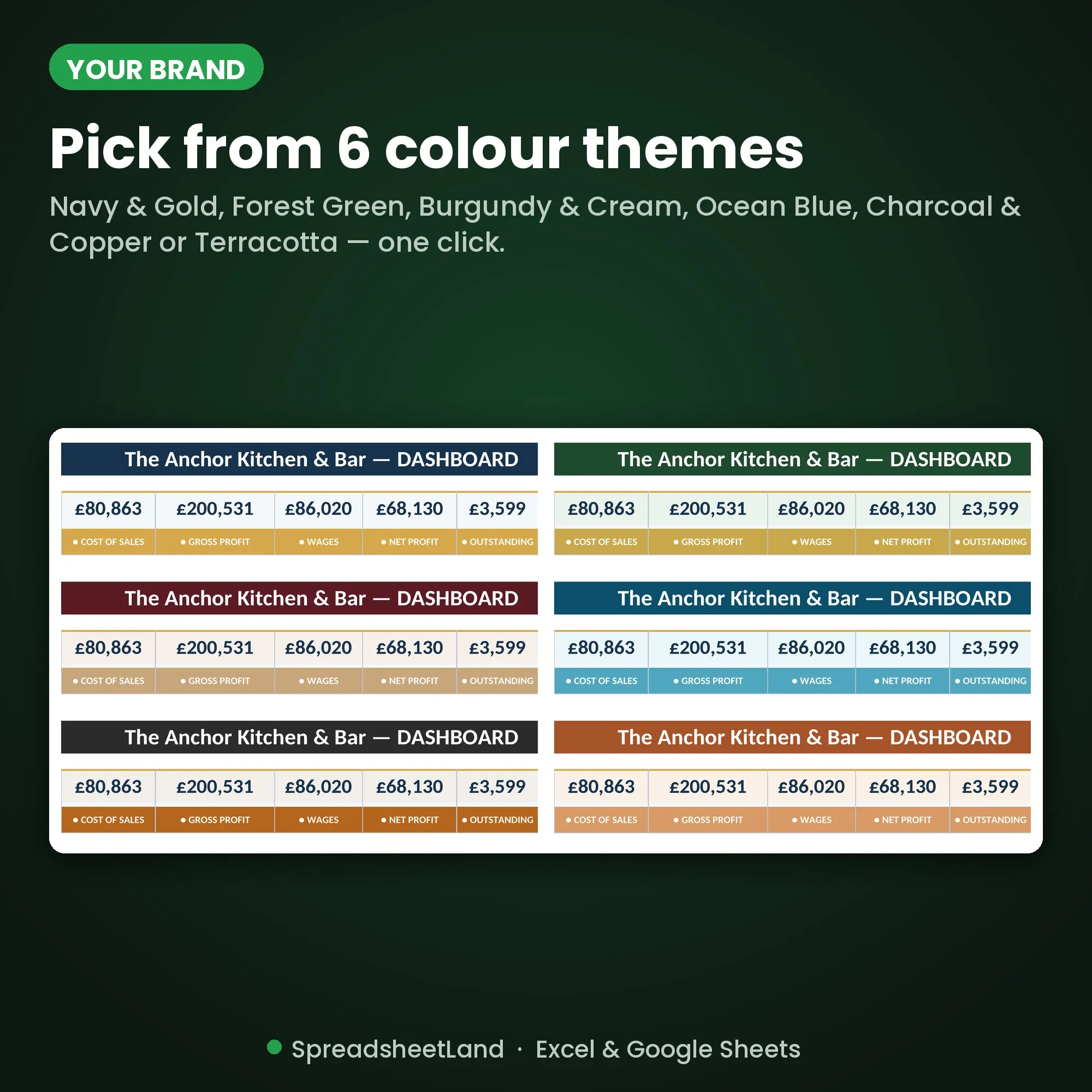
  • Six colour themes to match your venue

Where the money goes

A £14 burger. What does the plate really make?

Menu costing splits every dish out for you, so you can spot the ones that are priced too low.

£14.00Example: beef burger and chips, price on the menu
VAT (20%)£2.33
Ingredients£3.85
Card fee (1.5%)£0.21
Left for wages, rent and profit£7.61

Example figures for illustration. That’s a 67% gross profit on this dish. Your own dishes and prices go in the Menu & Recipe Costing tab.

£1,560

A year from one dish that was 50p too cheap, selling 60 a week

vs
£29.99

The Command Centre, once, to keep

Fix one underpriced dish and it pays for itself many times over. Buy now, instant download

How it fits together

Take a booking once. The rest updates itself.

  1. BookingsTable, party or function, with deposit
  2. InvoiceFills itself in from one Booking ID
  3. Daily takingsFood, drink, covers and spend per head
  4. DashboardRevenue, gross profit, wages and net profit
  5. Tax potAn estimate of what to put aside
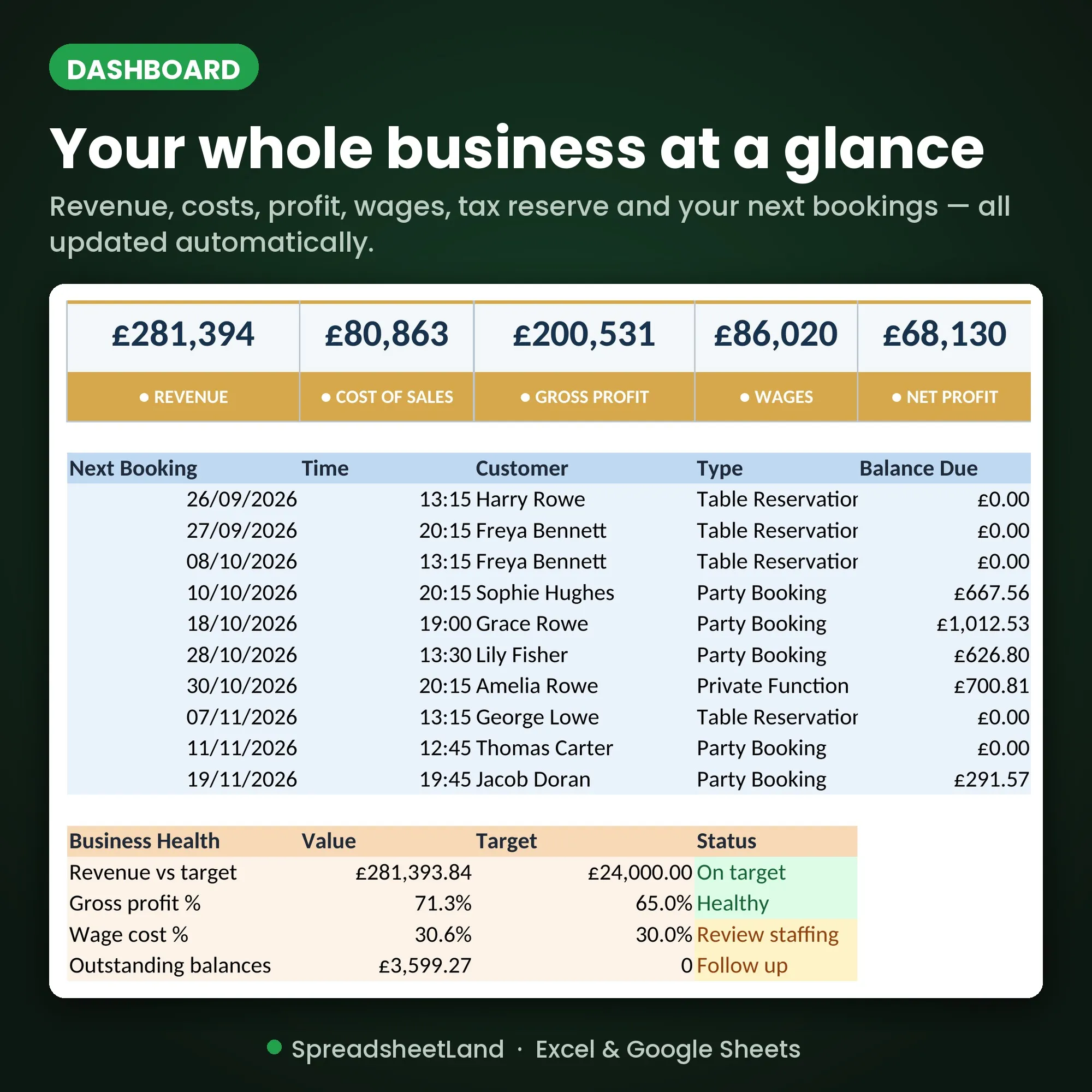
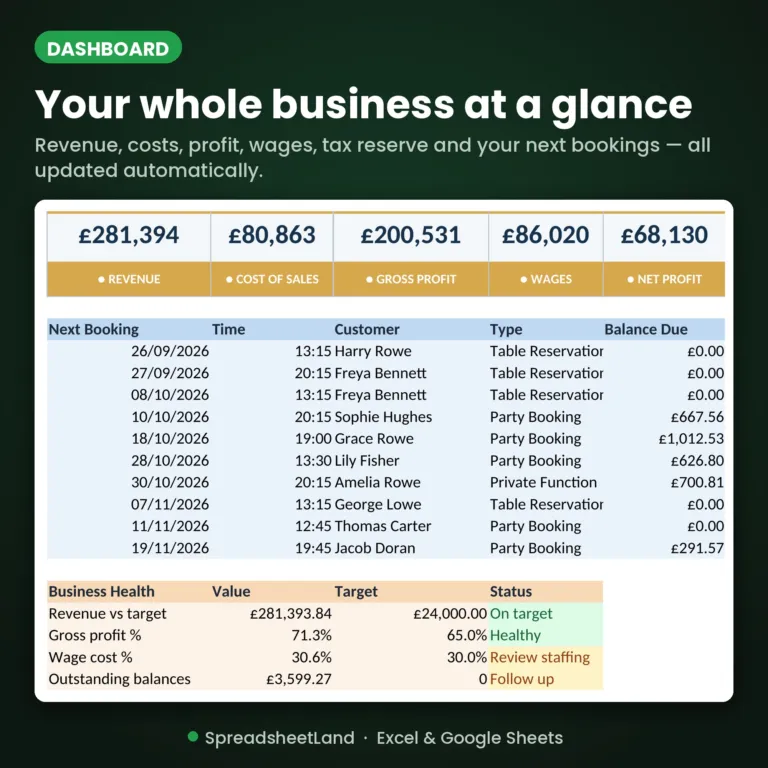
Hospitality Command Centre dashboard with revenue, costs and profit

The dashboard

Know tonight how the week is going.

Eight headline cards and live charts, from the filled-in example venue that comes with your download.

Tabs in one file16Bookings to tax summary
Colour themes6Match your venue
Rota rows5,000Shift cost worked out
Expense rows2,000Totals by category

What’s inside

Sixteen tabs, one file. Click through them.

Dashboard

Eight headline cards (revenue, cost of sales, gross profit, wages, net profit, outstanding balances, upcoming bookings and tax reserve) with live charts.

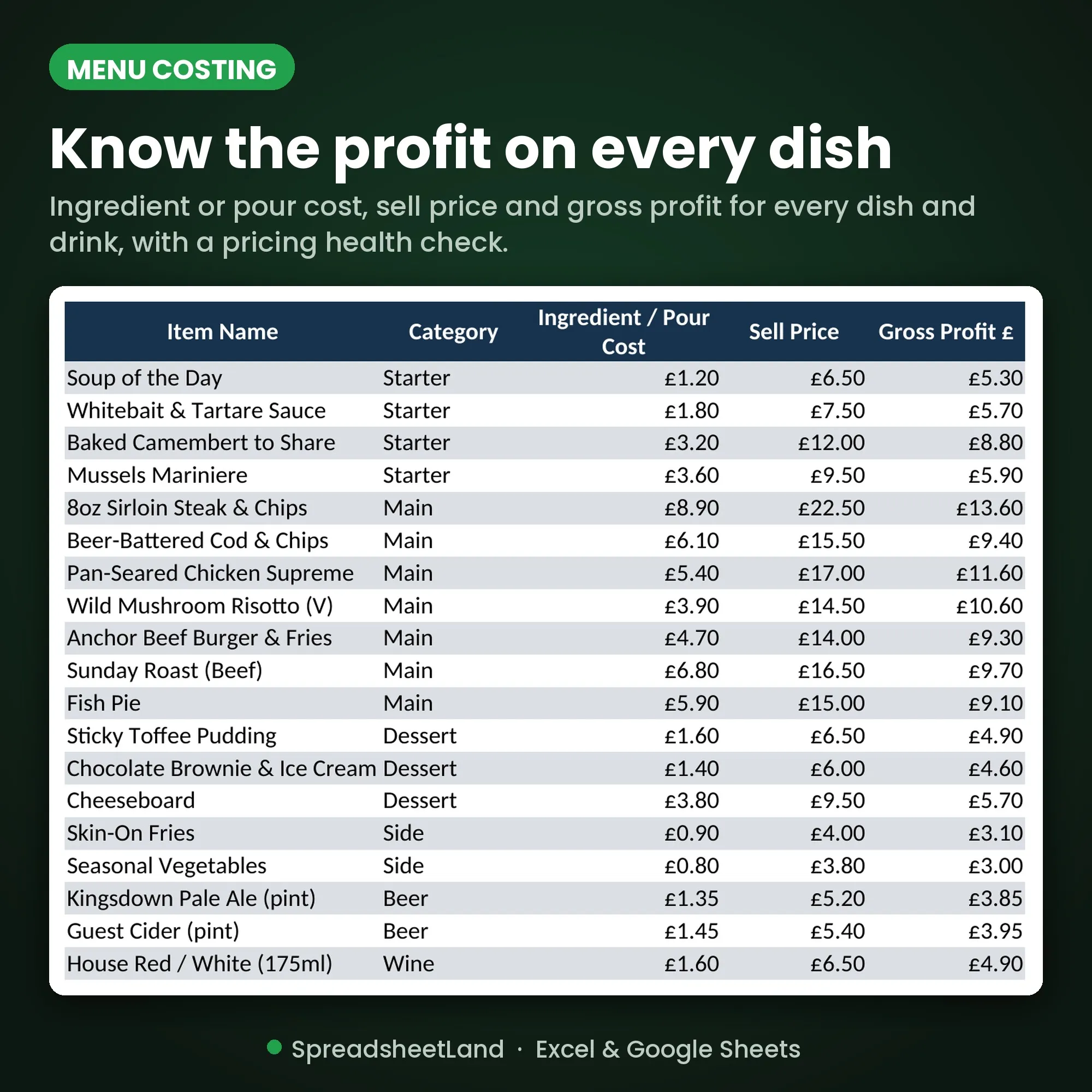
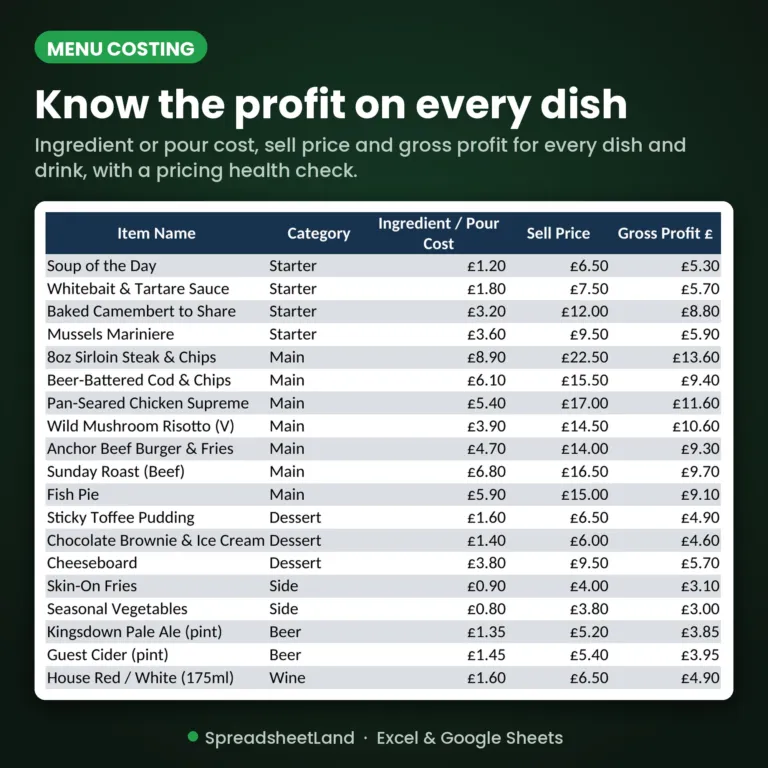
Menu and recipe costing tab with GP percentage

Menu costing

Know the real profit on every plate.

  • Cost and sell price for every dish and drink
  • Gross profit in pounds and as a GP %
  • A Healthy or Review flag on every line
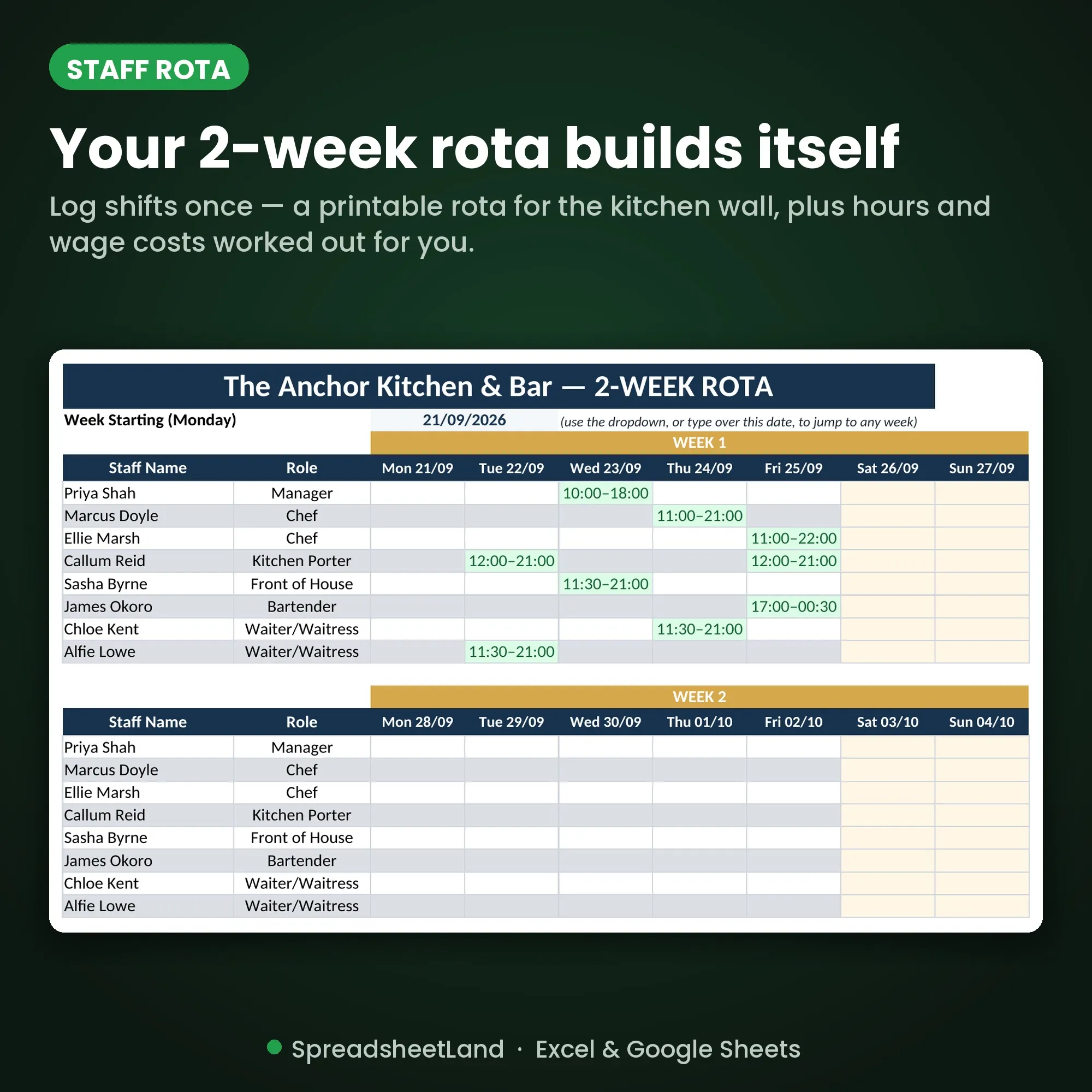
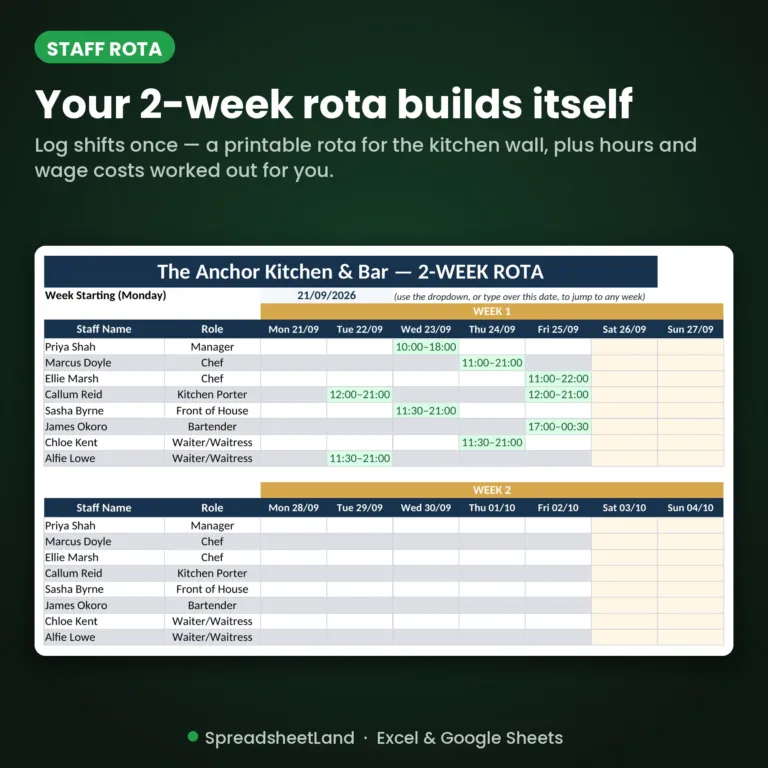
Staff rota tab with shift costs

Staff rota

The rota, without the group chat.

  • Pick a name and the role, rate, hours and shift cost fill in
  • Flag sick days and holidays
  • A clean two-week rota to print and pin up
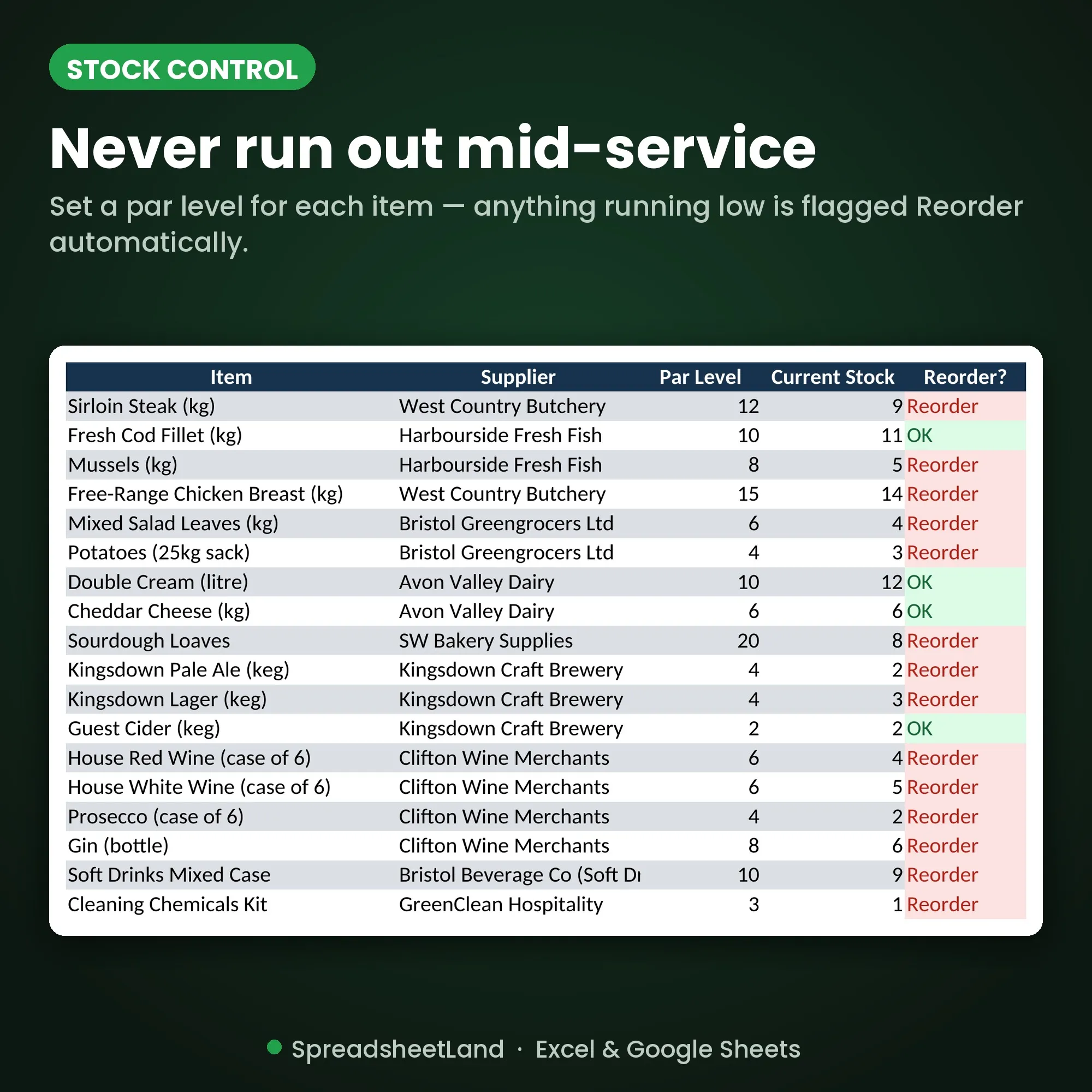
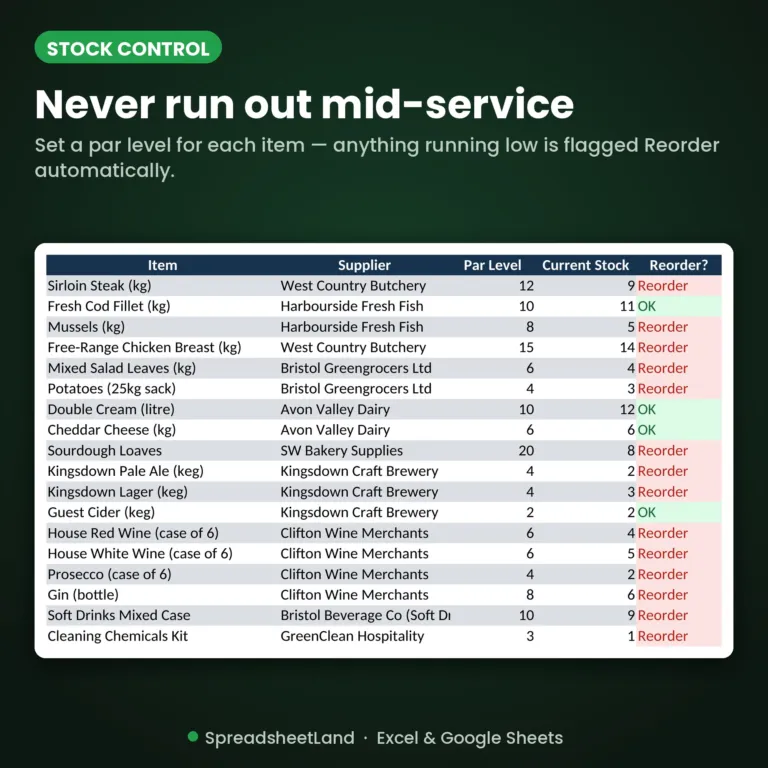
Stock control tab with reorder flags

Stock control

Spot it before you run out.

  • Par levels and current counts
  • Low items flagged Reorder automatically
  • Stock value worked out for you

Before and after

From guessing to knowing.

Without it

  • Bookings in a paper diary
  • Dishes priced on a hunch
  • Rota photographed and sent round
  • Takings added up on a calculator
  • Profit found out by your accountant

With the Command Centre

  • Every booking and deposit in one list
  • GP % on every dish
  • A printable rota with wages worked out
  • Daily takings and covers logged
  • Profit on the dashboard every time you open it

What you get

Everything in one download.

The blank workbookReady for your venue
A filled-in example venueSee it all working before you add your own
Start Here guideBuilt into the workbook, one step per tab
Six colour themesNavy & Gold, Forest Green, Ocean Blue and more
Works everywhereExcel, Google Sheets or LibreOffice, Mac or PC
Help if you’re stuckMessage me any time and I’ll help you set up

Up and running before service

Four steps.

  1. Buy and downloadThe link arrives straight away
  2. Open itIn Excel, or upload it to Google Sheets
  3. Add your detailsFollow the Start Here tab
  4. Start using itEverything else updates itself

Made for

  • Independent restaurants, pubs, bars and cafés in the UK
  • Owners and managers who do the admin themselves
  • Anyone who’d rather not pay monthly for software

Not for

  • Running a till or taking card payments
  • Payroll or filing your tax return
  • Large chains with their own systems

A record-keeping spreadsheet, not accounting, tax or legal advice. It isn’t Making Tax Digital software. Based in the US? There’s a US Edition with dollars and sales tax.

Command Centre or single sheets?

One file for everything, or more detail where you need it.

✓ Included

In the Command Centre

Runs the whole business in one file.

  • ✓Menu costing: cost, price and GP % per dish
  • ✓Staff rota and wages
  • ✓Reservations and events
  • ✓Stock with par levels and reorder flags
  • ✓Daily takings, covers, cash and card
  • ✓Invoices, customers, suppliers and expenses
  • ✓Profit dashboard and charts
✗ Not included

Not in the Command Centre

Each of these is a separate, more detailed sheet.

Mix & match: any 3 sheets 15% off, any 5 25% off, 10 or more 40% off. The Command Centre counts too. See all hospitality sheets →

Before you buy

Questions

Do I need Microsoft Excel?

No. It works in Microsoft Excel, or free in Google Sheets.

Is it a subscription?

No. It is a one-off payment and the file is yours to keep. There are no monthly fees.

I'm not good with spreadsheets. Is this for me?

Yes. You just type into the input cells and the totals, charts and dashboard update themselves. There are no formulas to write, and the instructions in the file walk you through it.

Can I see it before I buy?

Yes. Look through the screenshots above. Your download also includes a second copy filled in with example data, so you can see exactly how it works before adding your own.

Is it Making Tax Digital (MTD) software?

No. It is a record-keeping spreadsheet that keeps your figures organised. If Making Tax Digital for Income Tax applies to you, you will need MTD-compatible software to submit your returns to HMRC.

Does it work on a Mac, iPad or phone?

Yes on a Mac: use Excel for Mac, or open it free in Google Sheets in your web browser. On an iPad or phone you can open it in the free Excel or Google Sheets app to check and update it, but a computer is easier for setting it up.

Can I get a refund?

Because it is an instant digital download, I can’t offer a refund once the file has been downloaded. If the file is faulty and I can’t fix it, you were charged twice, or you received the wrong product, I will put it right or refund you. See the Refund Policy. This doesn’t affect your statutory rights.

How do I get my file?

It is an instant digital download. You will get a download link straight after checkout, and by email.

What if I get stuck?

Message me any time and I will help you get set up.

Ready when you are

Spend less time on admin and more with your customers.

£29.99 once. Download it tonight, use it at tomorrow’s service.

Buy now, instant download

More spreadsheets for restaurants, pubs & cafés →

Full product details, tabs list and notes

Description

What’s in your download

  • Your blank spreadsheet – ready for your own details (Excel and Google Sheets)
  • A filled-in DEMO copy – the same sheet with sample data, so you can see every tab working
  • A full PDF user guide – set-up, every tab explained, a simple routine, the HMRC and UK rules that apply, troubleshooting and FAQs

Make life easy with ONE spreadsheet

Running a restaurant, bar, pub or café means juggling bookings, deposits, rotas, suppliers, stock, invoices and receipts — usually spread across a paper diary, a group chat, a shoebox and a few half-finished spreadsheets.

The Hospitality Command Centre pulls all of it into one organised workbook that does the maths for you — so you spend less time on admin and more time with your customers.

Based in the US? Get the US Edition (Hospitality Command Center), with dollars, US dates, sales tax and US wording.

Sound familiar?

  • A table or the function room double-booked because the diary wasn’t in one place
  • Deposits and balances chased late — or forgotten altogether
  • Dishes priced on a guess, with no idea of the real profit per plate
  • The rota scribbled on paper, photographed and sent round the group chat
  • Running out of stock mid-service because nobody spotted it was low
  • No real idea what last month’s takings, costs and profit were until you sit down with a calculator

None of that is a “you” problem — it’s a missing-system problem. This fixes it.

Why you’ll love it

  • ✔ Enter things once — your dashboard, invoices, charts and tax reserve all update themselves
  • ✔ See your whole business at a glance the moment you open it
  • ✔ Invoices fill themselves in — and every one is saved, so you can pull it back up in seconds
  • ✔ Works in Excel and Google Sheets — no macros, no add-ons, no monthly subscription
  • ✔ Make it yours with 6 colour themes
  • ✔ Comes with a fully filled-in example venue, so you can see exactly how it all works before adding your own data

What’s inside — 16 tabs

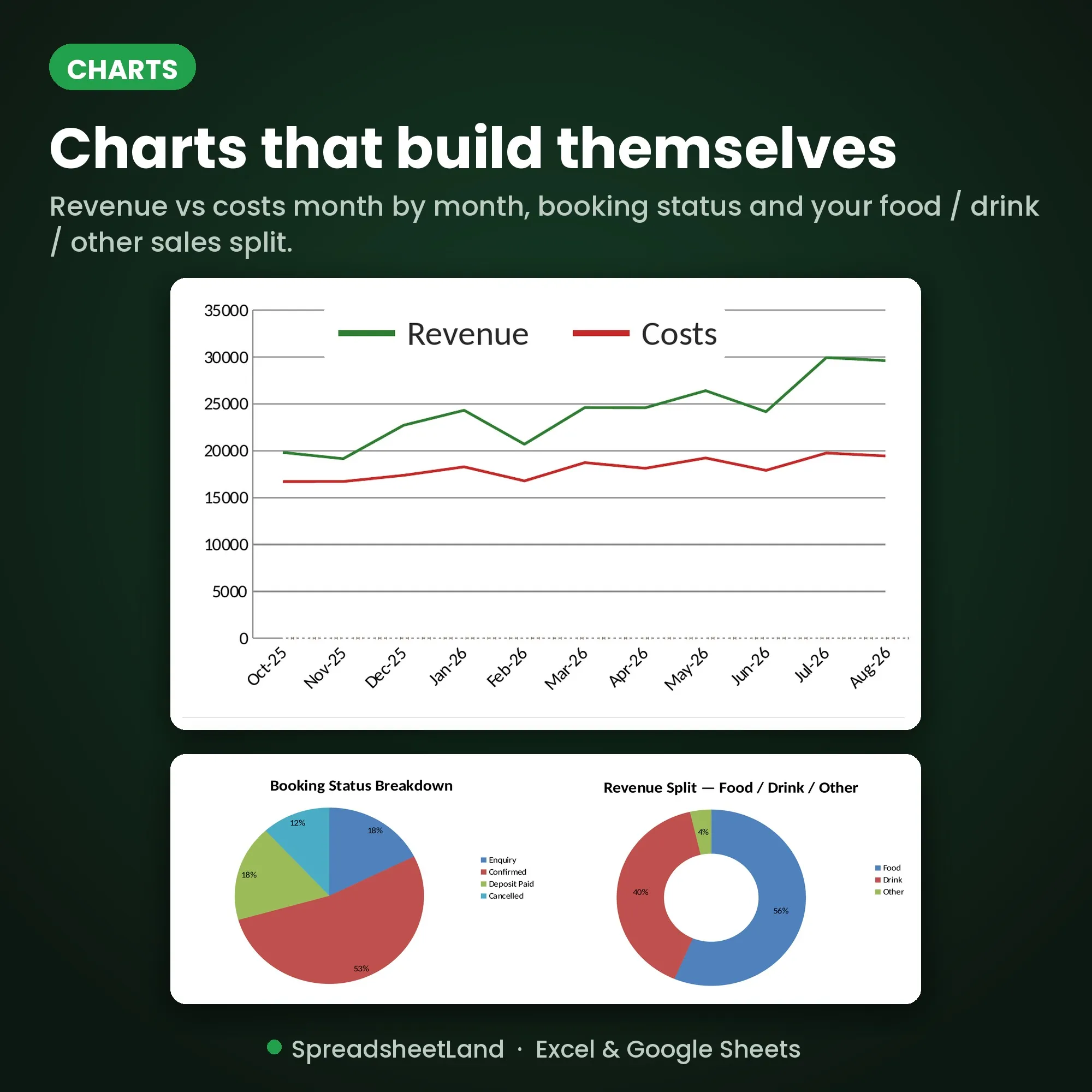
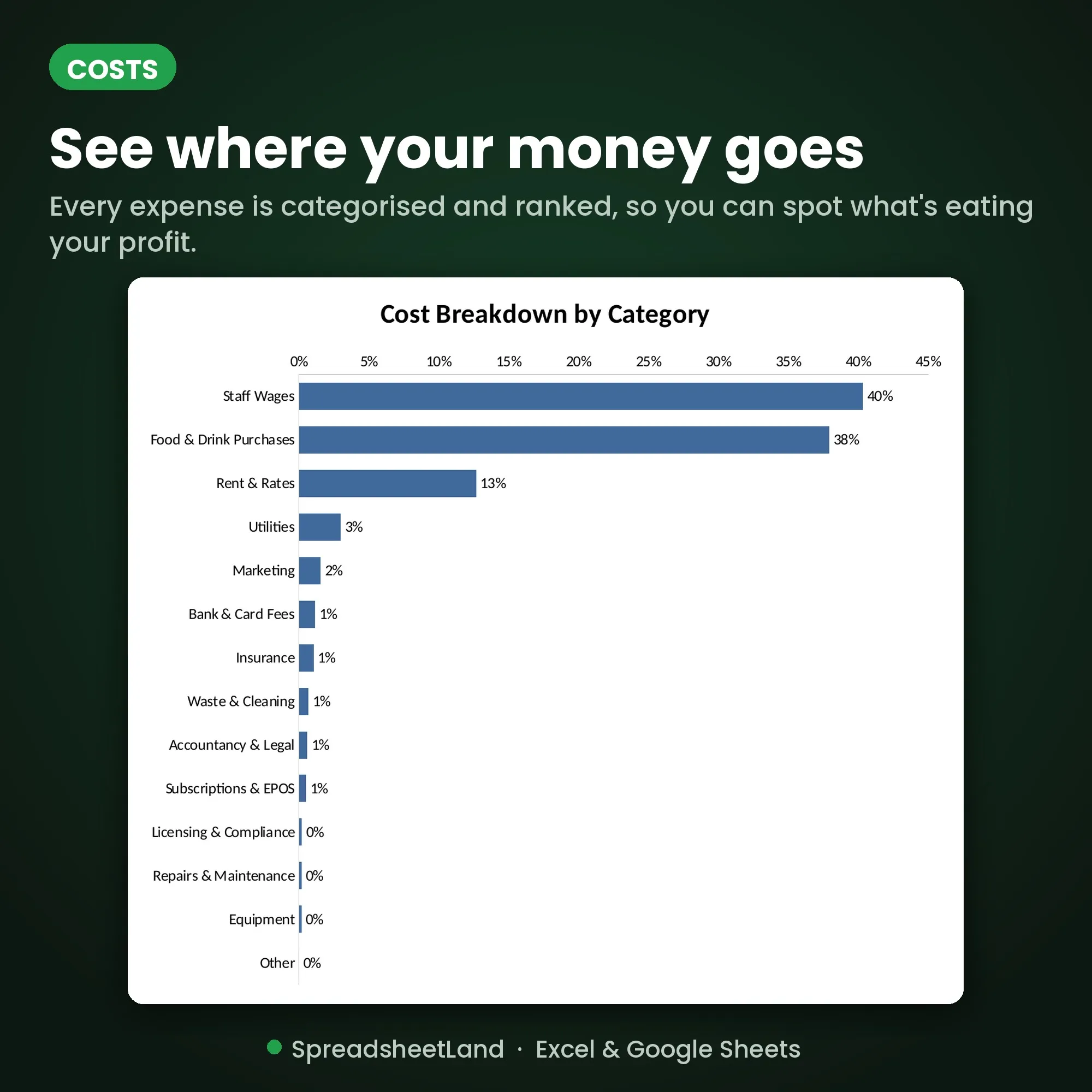
DASHBOARD — eight headline cards (revenue, cost of sales, gross profit, wages, net profit, outstanding balances, upcoming bookings and tax reserve), your next 10 bookings, colour-coded business health checks (revenue vs target, gross profit %, wage cost %, outstanding balances), staff costs this month vs last — plus charts that build themselves: revenue vs costs by month, cost breakdown by category, booking status, and your food / drink / other sales split.

VIEW BOOKINGS — just today’s and tomorrow’s bookings, with times. Perfect for the host stand or the pass.

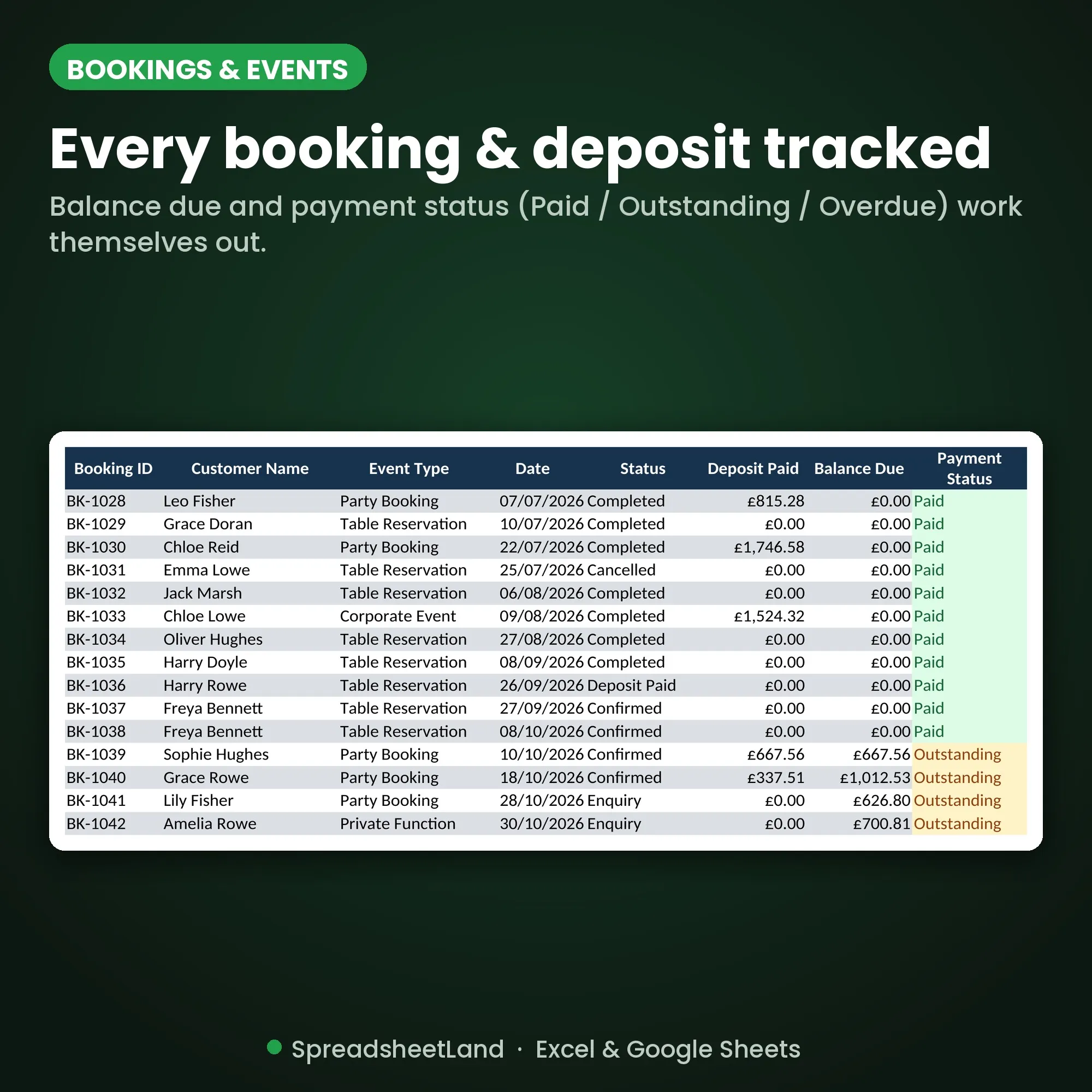
RESERVATIONS & EVENTS — every table booking, party and private function with party size, room/area, status, quoted value and deposit. Balance due and payment status (Paid / Outstanding / Overdue) work themselves out.

DAILY TAKINGS — food, drink and other sales each day, covers, average spend per cover and the cash/card split.

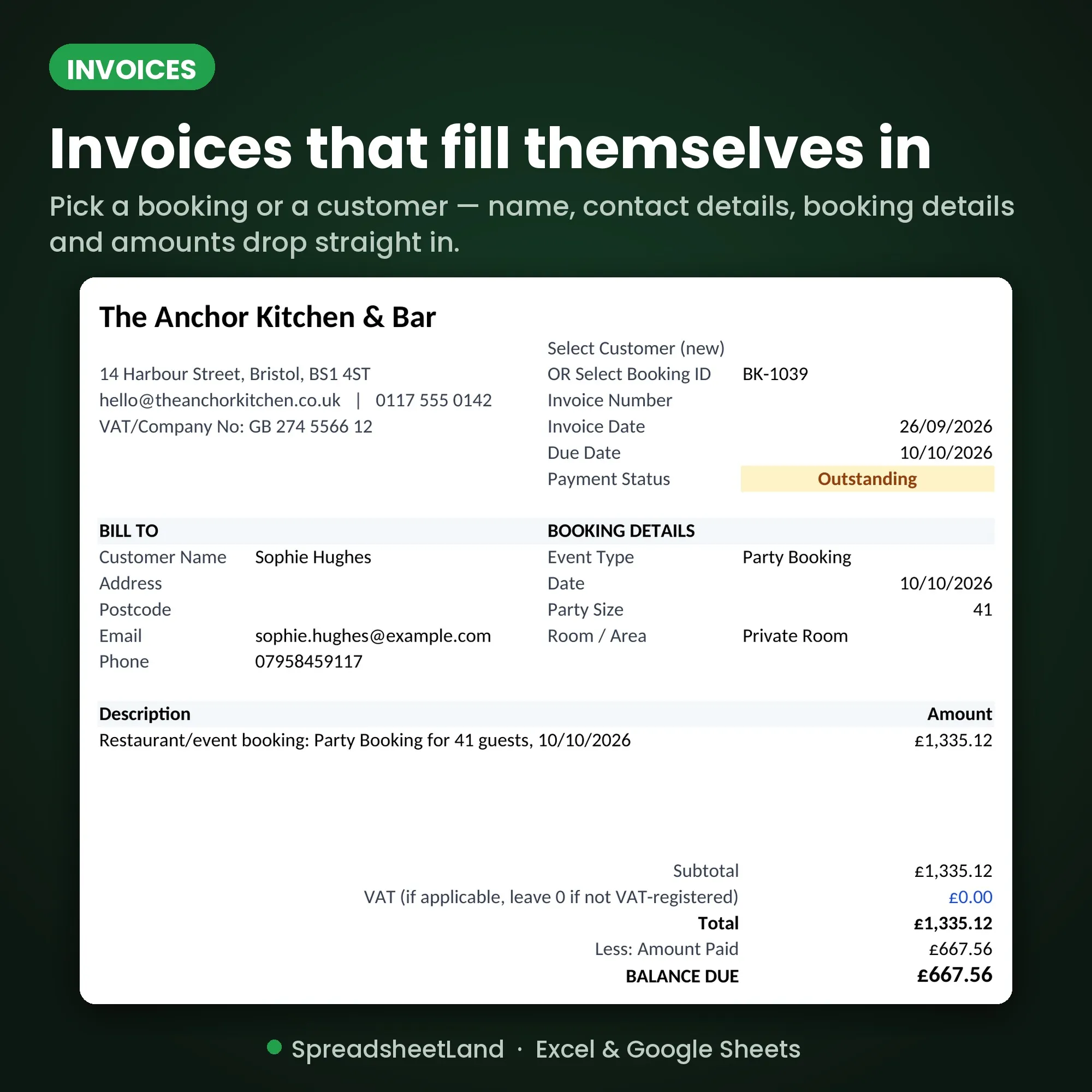
INVOICE — pick a Booking ID or a customer and a professional invoice fills itself in: your business details, bill-to, booking details, line items, VAT, amount paid and balance due. Save as a PDF and send.

INVOICE REGISTER — NEW — every invoice is logged with up to five line items. Type or pick an invoice number on the Invoice tab and the whole invoice reloads exactly as it was sent — ideal for re-sending or chasing payment.

CUSTOMER DATABASE — regulars, corporate accounts and private clients with contact details and a lifetime invoiced total.

MENU & RECIPE COSTING — cost and sell price for every dish and drink, with gross profit £, GP % and a Healthy/Review flag against your target margin.

STOCK CONTROL — par levels and current counts; anything running low is flagged Reorder automatically, with stock value worked out for you.

SUPPLIERS — contacts, account references and total spend per supplier, calculated from your expenses.

EXPENSES — 2,000 ready-to-use rows. Pick a category and totals by category update instantly.

STAFF LIST — your team with roles, hourly rates, and hours and pay to date.

STAFF ROTA — 5,000 rows for shifts. Pick a name and the role, hourly rate, hours and shift cost fill in. Flag sick days and leave.

ROTA VIEW — a clean, printable 2-week rota built automatically — pin it up in the kitchen or behind the bar.

SETTINGS — your business details, targets, payment terms, tax reserve % and your choice of 6 colour themes: Navy & Gold, Forest Green, Burgundy & Cream, Ocean Blue, Charcoal & Copper or Terracotta.

START HERE — a simple step-by-step guide, so you’re up and running in minutes. No spreadsheet skills needed.

Plus a UK Tax Year Summary — revenue, expenses, net profit and an estimated tax reserve, calculated automatically.

What you get

  • Hospitality_Command_Centre.xlsx — your blank, ready-to-use workbook
  • Hospitality_Command_Centre_DEMO.xlsx — a fully filled-in example venue, so you can see everything working

Format

Instant digital download. Works in Microsoft Excel, Google Sheets and LibreOffice — on Mac, PC, Chromebook or tablet. Nothing to install.

How it works

  1. Buy and download
  2. Open in Excel, or upload to Google Sheets
  3. Follow the Start Here tab to add your business details and pick your colour theme
  4. Start logging bookings, takings and costs — everything else updates itself

One payment of £29.99. No subscription, ever.

Please note

This is a digital product — nothing will be posted. It’s a business-management template, not accounting or tax advice. For use in your own business only — please don’t resell or share the file.

Questions before you buy? Message me any time — happy to help!

Restaurant & Pub Spreadsheet FAQ

Do I need Microsoft Excel?

No. It works in Microsoft Excel, or free in Google Sheets.

Is it a subscription?

No. It is a one-off payment and the file is yours to keep. There are no monthly fees.

I’m not good with spreadsheets. Is this for me?

Yes. You just type into the input cells and the totals, charts and dashboard update themselves. There are no formulas to write, and the instructions in the file walk you through it.

Can I see it before I buy?

Yes. Look through the screenshots above. Your download also includes a second copy filled in with example data, so you can see exactly how it works before adding your own.

Is it Making Tax Digital (MTD) software?

No. It is a record-keeping spreadsheet that keeps your figures organised. If Making Tax Digital for Income Tax applies to you, you will need MTD-compatible software to submit your returns to HMRC.

Does it work on a Mac, iPad or phone?

Yes on a Mac: use Excel for Mac, or open it free in Google Sheets in your web browser. On an iPad or phone you can open it in the free Excel or Google Sheets app to check and update it, but a computer is easier for setting it up.

Can I get a refund?

Because it is an instant digital download, I can’t offer a refund once the file has been downloaded. If the file is faulty and I can’t fix it, you were charged twice, or you received the wrong product, I will put it right or refund you. See the Refund Policy. This doesn’t affect your statutory rights.

How do I get my file?

It is an instant digital download. You will get a download link straight after checkout, and by email.

What if I get stuck?

Message me any time and I will help you get set up.