Budget & Savings Tracker

Original price was: £12.00.Current price is: £9.99.

Take control of your monthly money with a polished Excel budget and savings tracker. Plan income and expenses, compare actual spending, monitor savings goals and see your results on an automatic dashboard. Choose from seven display currencies — no macros and no exchange-rate conversion.

Digital download, available immediately. By buying, including with Google Pay or Amazon Pay, you agree to immediate access and that your 14-day right to cancel ends once your download is available. See our Terms and Refund Policy.

HouseholdsCouplesStudentsFamiliesFirst homesSaversDebt-free plansHoliday fundsEmergency fundsChristmas savings
Instant downloadLink straight after checkout and by email
Built for Microsoft ExcelAlso opens in Google Sheets. No macros
Start Here guide built inPlain-English steps for every tab
Secure checkoutCard, Apple Pay and Google Pay

Sound familiar?

Where does the money actually go each month?

  • Payday feels great, then the month runs out before the money does
  • Direct debits you forgot you were paying
  • Savings goals that never seem to move
  • Budgeting apps that want a monthly fee
  • No idea if this month was better or worse than last

That’s not a you problem. It’s a missing-system problem.

Why people love it

Plan the month. See where it went.

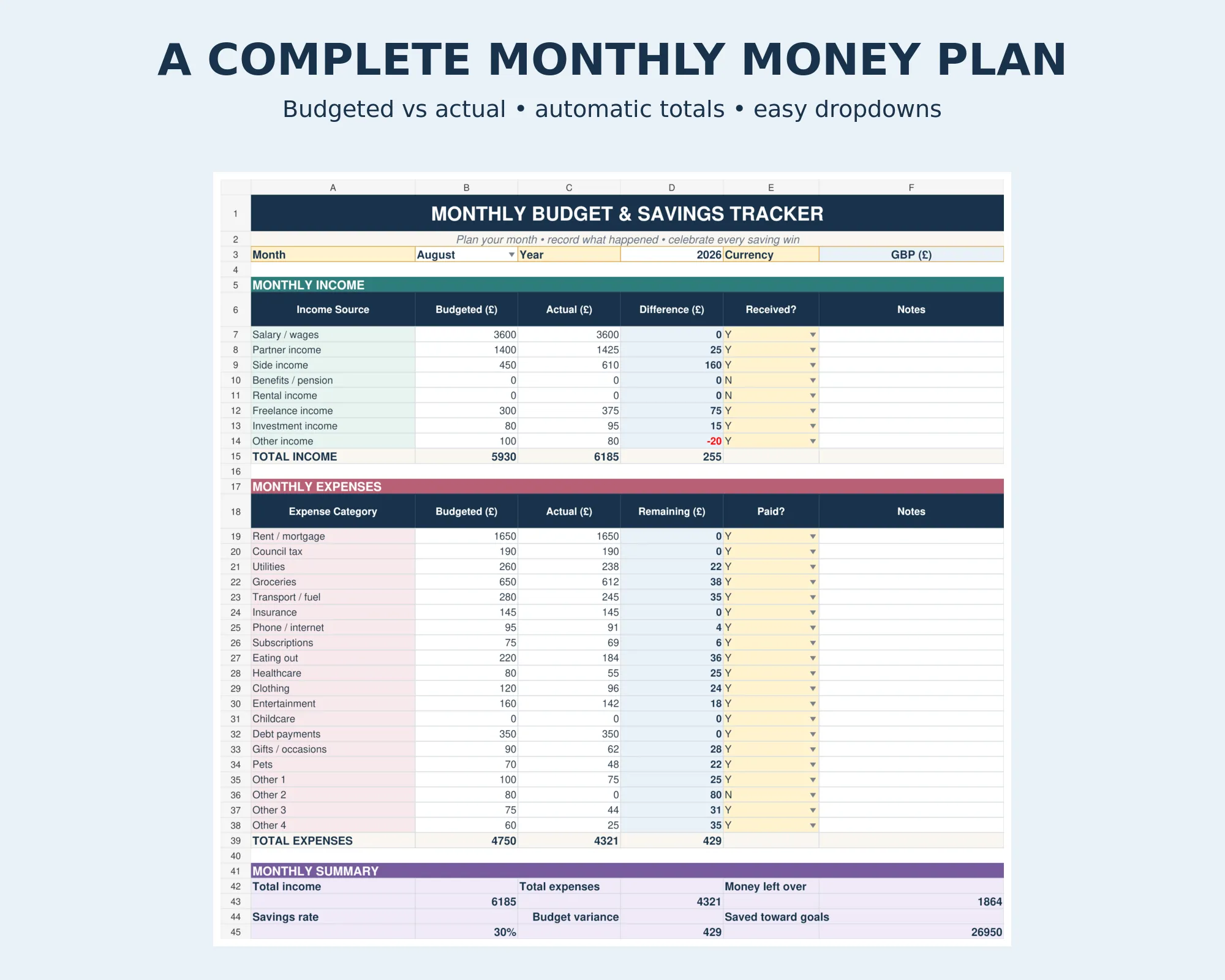
  • Budget against actual for every category
  • 20 expense categories and 8 income sources, all editable
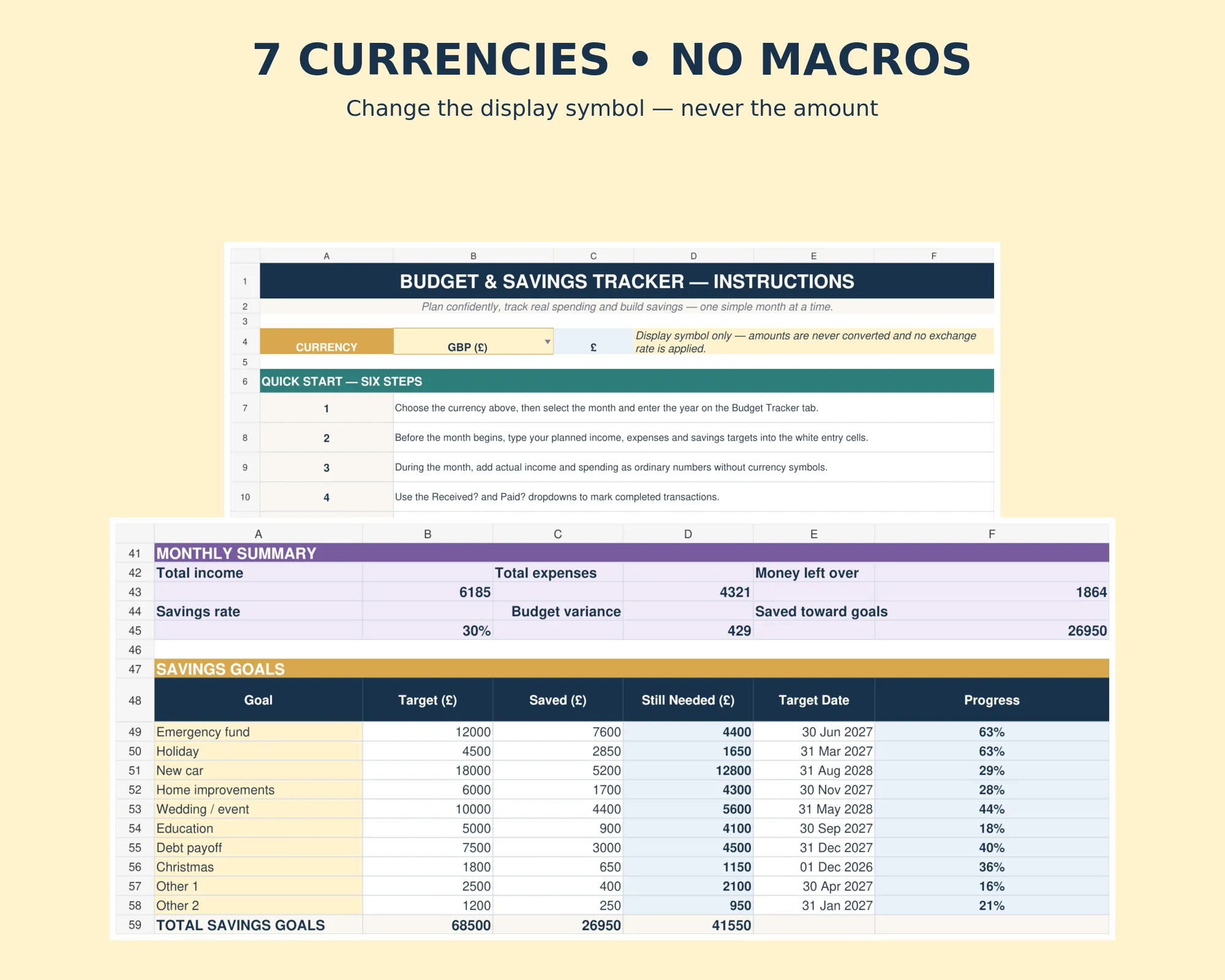
  • 10 savings goals with targets, dates and progress
  • Received? and Paid? ticks so nothing’s missed
  • An automatic dashboard with the key figures
  • No app, no subscription, and no bank login needed

Built for a real budget

Every pound given a job.

Plan what comes in and goes out, then see where you’re over or under.

20Expense categories
8Income sources
10Savings goals

How it fits together

Plan once. See where it went.

  1. IncomeWhat’s coming in
  2. BudgetWhat you plan to spend
  3. ActualWhat really happened
  4. SavingsGoals and progress
  5. DashboardOver or under, at a glance
Monthly budget with budgeted and actual spending

The month

See the month at a glance.

Income, spending and savings, budgeted against actual.

Expense categories20All editable
Income sources8All editable
Savings goals10With targets and dates
Monthly fees£0No app subscription

What’s inside

Everything in one file. Click through it.

Dashboard

Key monthly figures at a glance: income, spending, left over and savings.

Savings goals with targets and progress

Savings goals

Watch your savings grow.

  • Up to 10 goals
  • Targets and dates for each
  • Progress worked out for you

Before and after

From guessing to knowing.

Without it

  • Money gone before payday
  • Forgotten direct debits
  • Savings that don’t move
  • An app with a monthly fee

With the tracker

  • A plan for every pound
  • Every bill ticked off
  • Goals with real progress
  • One payment, yours to keep

What you get

Everything in one download.

The budget trackerReady for this month
Instructions tabPlain-English steps
Seven currenciesPick yours from a list
No macrosA clean, safe .xlsx file
Built for ExcelWindows or Mac. Also opens in Google Sheets
Help if you’re stuckMessage me any time

Set up tonight

Four steps.

  1. Buy and downloadThe link arrives straight away
  2. Pick the monthAnd your currency
  3. Add your budgetIncome and planned spending
  4. Track as you goThe dashboard does the rest

Made for

  • Households and couples
  • Anyone saving for something
  • People who don’t want a budgeting app

Not for

  • Connecting to your bank
  • Financial advice
  • Business accounts

A budgeting spreadsheet, not financial advice.

Before you buy

Questions

Do I need Microsoft Excel?

It is built for Microsoft Excel (.xlsx). Excel on Windows or Mac is recommended so every feature works as designed.

Is it a subscription?

No. It is a one-off payment and the file is yours to keep. There are no monthly fees.

I'm not good with spreadsheets. Is this for me?

Yes. You just type into the input cells and the totals, charts and dashboard update themselves. There are no formulas to write, and the instructions in the file walk you through it.

Can I see it before I buy?

Yes. The screenshots above show the main tabs, and you are welcome to message me with any questions first.

Does it work on a Mac, iPad or phone?

Yes on a Mac with Excel for Mac. On an iPad or phone you can open it in the free Excel app to check and update it, but Excel on a computer is best so every feature works as designed.

Can I get a refund?

Because it is an instant digital download, I can’t offer a refund once the file has been downloaded. If the file is faulty and I can’t fix it, you were charged twice, or you received the wrong product, I will put it right or refund you. See the Refund Policy. This doesn’t affect your statutory rights.

How do I get my file?

It is an instant digital download. You will get a download link straight after checkout, and by email.

What if I get stuck?

Message me any time and I will help you get set up.
Ready when you are

Know where your money goes.

£9.99 once. Download it now and plan this month tonight.

Buy now, instant download

More spreadsheets for home & money →

Full product details, tabs list and notes

Description

What’s in your download

  • Your blank spreadsheet – ready for your own details (Excel and Google Sheets)
  • A filled-in DEMO copy – the same sheet with sample data, so you can see every tab working
  • A full PDF user guide – set-up, every tab explained, a simple routine, the HMRC and UK rules that apply, troubleshooting and FAQs

About This Monthly Budget Spreadsheet

Make budgeting feel clear, calm and achievable.

This premium Budget & Savings Tracker is designed for customers who want one attractive place to plan a month, record real figures and see exactly where their money is going. The automatic dashboard turns entries into an instant overview of income, expenses, money left over, savings rate and goal progress.

What’s Inside the Monthly Budget Spreadsheet

  • Clean Budget & Savings Tracker .xlsx file
  • Automatic dashboard with key monthly figures
  • Monthly income and expense sections
  • Budgeted versus actual comparisons
  • 20 editable expense categories
  • 8 editable income sources
  • 10 savings goals with targets, dates and progress
  • Month, Received? and Paid? dropdowns
  • Seven-currency display selector
  • Comprehensive Instructions tab

Currency Options

GBP (£), USD ($), EUR (€), AUD (A$), CAD (C$), NZD (NZ$) and JPY (¥).

Changing the selector changes the displayed currency symbol only. It does not convert amounts or apply exchange rates. Enter ordinary numbers without typing currency symbols.

Compatibility

Designed for Microsoft Excel as a normal macro-free .xlsx file. It can also be uploaded to Google Sheets. Core formulas and dropdowns are compatible, although chart styling and conditional number formatting may appear slightly different after import.

How It Works

  1. Open the Instructions tab and choose your currency.
  2. Select the month and enter the year.
  3. Add budgeted and actual income and expenses.
  4. Update your savings goals.
  5. Review the automatic dashboard.

Please Note

This is a digital spreadsheet download. No physical item will be posted. Spreadsheet software is required. This template is an organisational tool and does not provide financial, tax or investment advice.

How to Use a Monthly Budget Spreadsheet

  1. Plan the month – enter what you expect to earn and what you plan to spend in each category.
  2. Record what really happens – add your actual income and spending as the month goes on.
  3. Compare budget with actual – the sheet shows where you are over or under.
  4. Watch your savings grow – set up to 10 savings goals with targets and dates, and track your progress.

Who This Budget Planner Is For

This monthly budget spreadsheet suits individuals, couples and families who want to take control of their money, cut back on overspending, or save for something specific such as a holiday, a house deposit or an emergency fund. You do not need any spreadsheet experience: you type in your numbers and the dashboard does the rest.

Why a Budget Spreadsheet Instead of an App?

There is no subscription, no bank login and no adverts. Your figures stay in your own file, on your own computer, and you can change the categories to suit the way you live.

Monthly Budget Spreadsheet FAQ

Do I need Microsoft Excel?

It is built for Microsoft Excel (.xlsx). Excel on Windows or Mac is recommended so every feature works as designed.

Is it a subscription?

No. It is a one-off payment and the file is yours to keep. There are no monthly fees.

I’m not good with spreadsheets. Is this for me?

Yes. You just type into the input cells and the totals, charts and dashboard update themselves. There are no formulas to write, and the instructions in the file walk you through it.

Can I see it before I buy?

Yes. The screenshots above show the main tabs, and you are welcome to message me with any questions first.

Does it work on a Mac, iPad or phone?

Yes on a Mac with Excel for Mac. On an iPad or phone you can open it in the free Excel app to check and update it, but Excel on a computer is best so every feature works as designed.

Can I get a refund?

Because it is an instant digital download, I can’t offer a refund once the file has been downloaded. If the file is faulty and I can’t fix it, you were charged twice, or you received the wrong product, I will put it right or refund you. See the Refund Policy. This doesn’t affect your statutory rights.

How do I get my file?

It is an instant digital download. You will get a download link straight after checkout, and by email.

What if I get stuck?

Message me any time and I will help you get set up.
Reviews

There are no reviews yet.

Only logged in customers who have purchased this product may leave a review.