Holiday Let Command Centre — Bookings, Occupancy, Platform Fees & Day Count Spreadsheet (International)

£29.99

Build your landlord bundle

Tick the landlord sheets you want. The discount is worked out here and added in your basket automatically.

Any 3 – 15% offAny 5 – 25% off
  • £29.99
  • £29.99
  • £29.99
  • £29.99
  • £29.99

Every booking from every platform in one file – occupancy, ADR, RevPAR, platform fees, payouts, changeovers and cleaning costs, with a double-booking alarm and your country’s day-count test. Becomes a Vacation Rental Command Center (USA/Canada) or Short-Stay Holiday Home Command Centre (Australia/NZ). Works in Excel and Google Sheets.

Digital download, available immediately. By buying, including with Google Pay or Amazon Pay, you agree to immediate access and that your 14-day right to cancel ends once your download is available. See our Terms and Refund Policy.

Holiday letsVacation rentalsAirbnb hostsVrboBooking.comShort letsCottagesOccupancyDay countUKUSACanadaAustraliaNew Zealand
Instant downloadLink straight after checkout and by email
Excel or Google SheetsMac, PC, Chromebook. No macros
Start Here guide built inPlain-English steps for every tab
Secure checkoutCard, Apple Pay and Google Pay

Sound familiar?

What did you actually make after every platform took its cut?

  • Different fees and payout dates on every platform
  • A double booking you only spotted when the second guest messaged
  • Cleaner and linen costs scattered across messages and receipts
  • No idea if you’re on track for the day-count rules where you are
  • Occupancy and nightly rate worked out by guesswork

That’s not a you problem. It’s a missing-system problem.

Why hosts like it

Every booking, every platform, one file.

  • Platform fees and payouts worked out for every stay
  • Double-booking alarm on overlapping stays
  • Occupancy, ADR and RevPAR by property and platform
  • Changeovers and cleaning costs per stay
  • Day Count for your country’s rules

Built for short lets

Bookings in. Profit and occupancy out.

Log each booking once and the sheet does the fees, payouts, nights and day counts.

5Countries in one file
1,000Booking lines
0Formulas to write

How it fits together

Log the booking. Everything else follows.

  1. PropertiesCleaning and linen defaults
  2. BookingsFees and payout per stay
  3. ChangeoversCleaner pay and linen
  4. Day CountYour country’s test
  5. DashboardOccupancy, ADR, profit
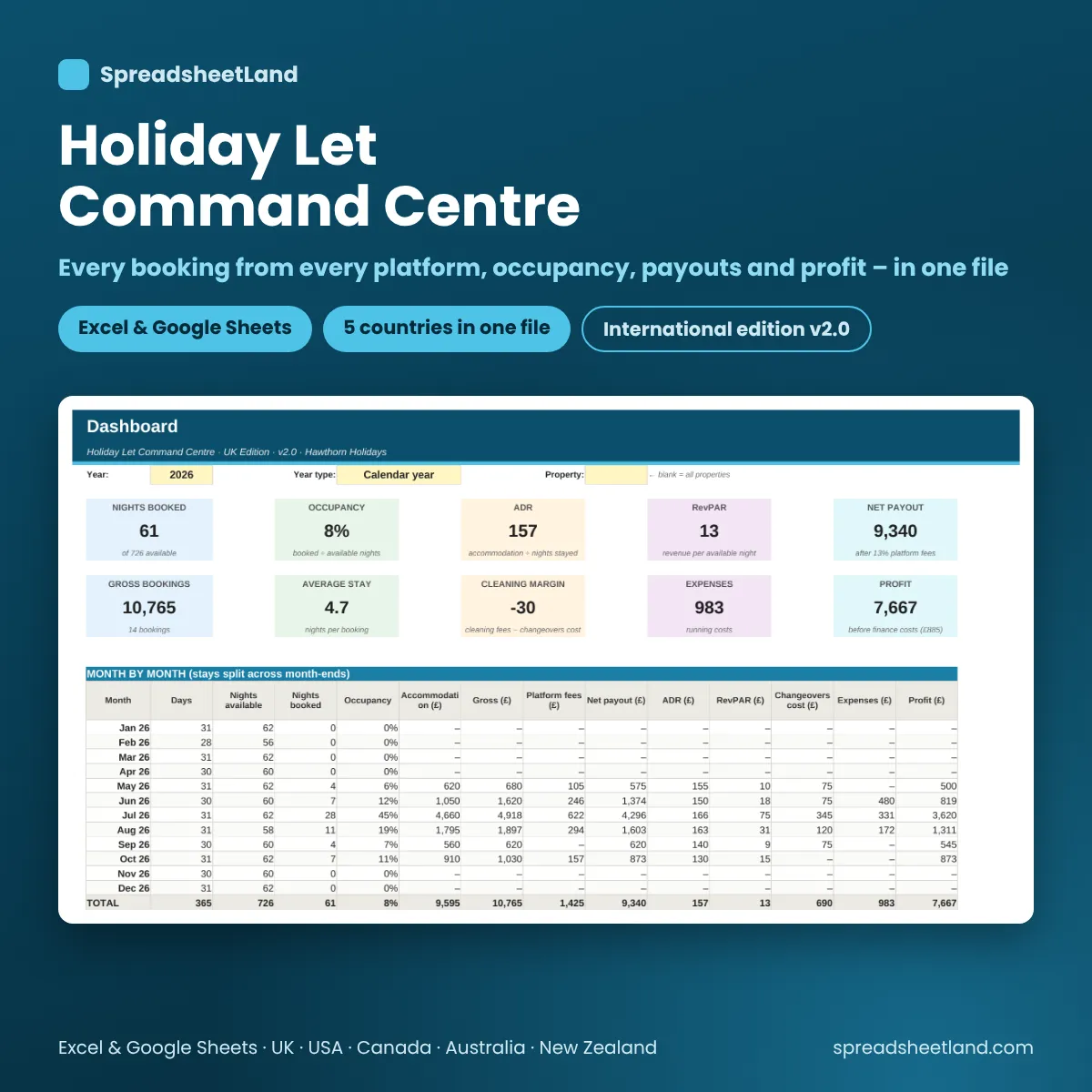
Holiday let dashboard with occupancy, ADR, RevPAR and payouts

The dashboard

Your year at a glance.

Nights booked, occupancy, ADR, RevPAR, payouts and profit by month, property and platform.

Countries5UK, USA, CA, AU, NZ
PlatformsAnyAirbnb, Vrbo, direct and more
Double bookingsFlaggedOverlapping stays
Day CountAutoYour country’s test

What’s inside

Everything in one file. Click through it.

Dashboard

Occupancy, ADR, RevPAR, income by platform and property, upcoming changeovers.

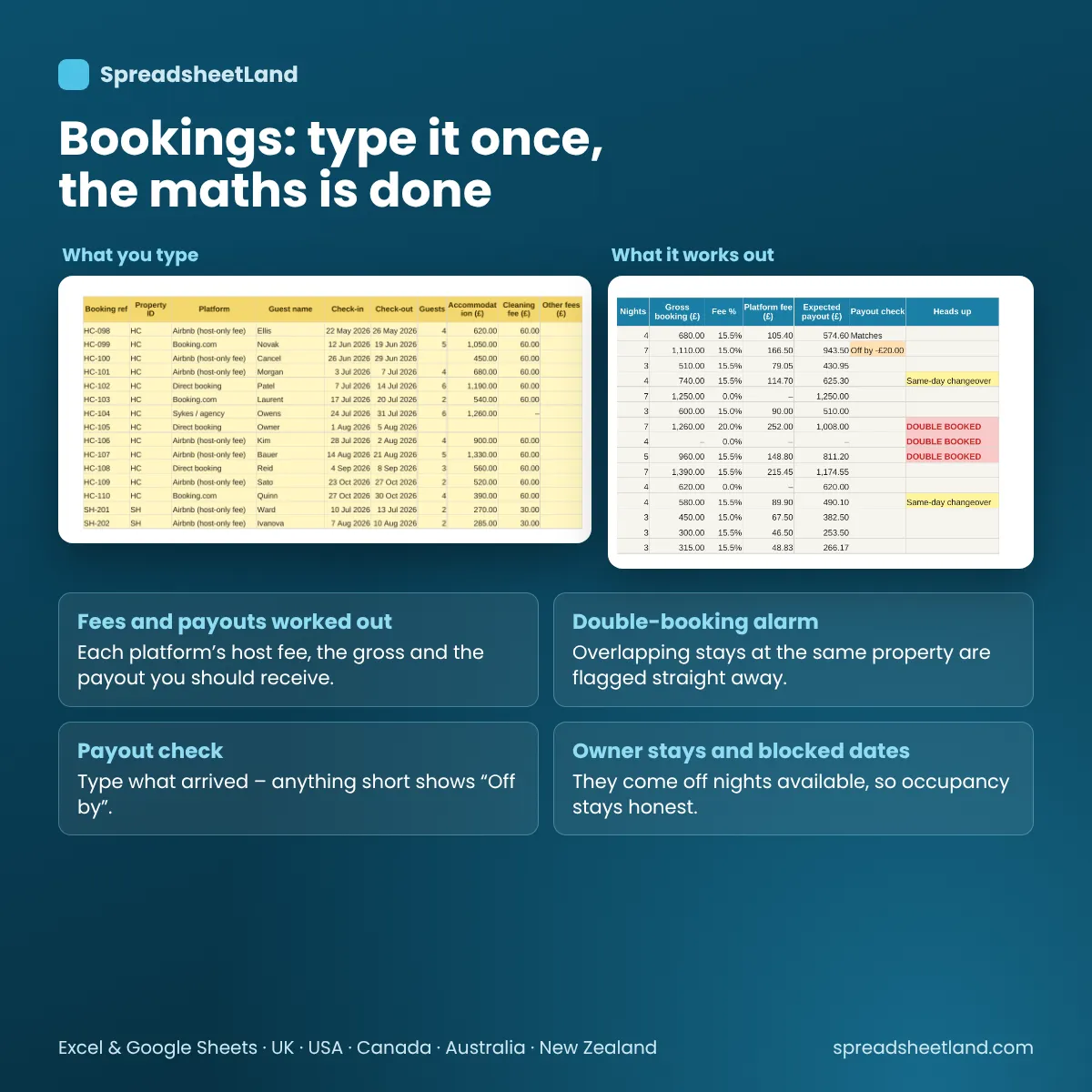
Bookings with fees and payouts

Bookings

Type it once, the maths is done.

  • Platform fee and payout per stay
  • Nights and nightly rate
  • Double-booking alarm
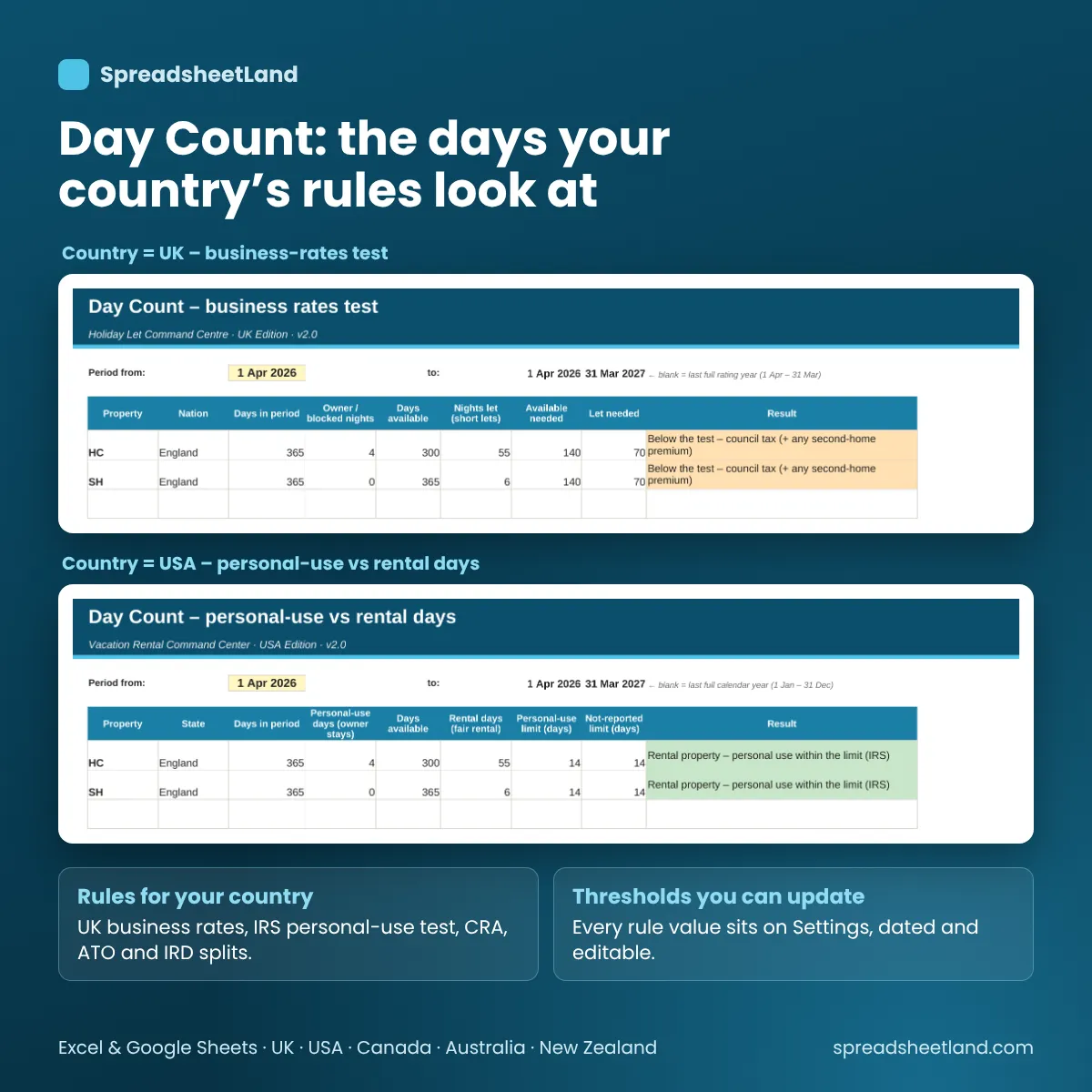
Day Count for your country

Day Count

Know where you stand on the day rules.

  • UK business-rates tests
  • US 14-day / 10% rule
  • Canada, Australia and NZ splits

Before and after

From guessing to knowing.

Without it

  • Five platform dashboards
  • Fees worked out by hand
  • Cleaning costs in your messages
  • Guessing your day count

With the command centre

  • Every booking in one place
  • Fees and payouts worked out
  • Changeover costs per stay
  • Day count done for you

What you get

Everything in one download.

The blank command centreReady for your bookings
A filled-in exampleA year of bookings
PDF user guideEvery tab explained
Five countriesUK, USA, Canada, Australia, NZ
Works in ExcelAnd Google Sheets, Mac or PC
Help if you’re stuckEmail any time

Ready for your next guest

Four steps.

  1. Buy and downloadThe link arrives straight away
  2. Pick your countryOn the Settings tab
  3. Add properties and platformsCleaning and fee defaults
  4. Log each bookingThe dashboard fills itself in

Made for

  • Holiday let and vacation rental owners
  • Airbnb, Vrbo and Booking.com hosts
  • Owners with one or several short lets

Not for

  • Channel managers or automatic calendar sync
  • Tax or legal advice
  • Guest messaging

Day-count and tax results are estimates, not tax advice.

Ready when you are

Know what every booking really made.

£29.99 once. Download it now and log your next stay.

Buy now, instant download

More spreadsheets for landlords and property →

Full product details, tabs list and notes

Description

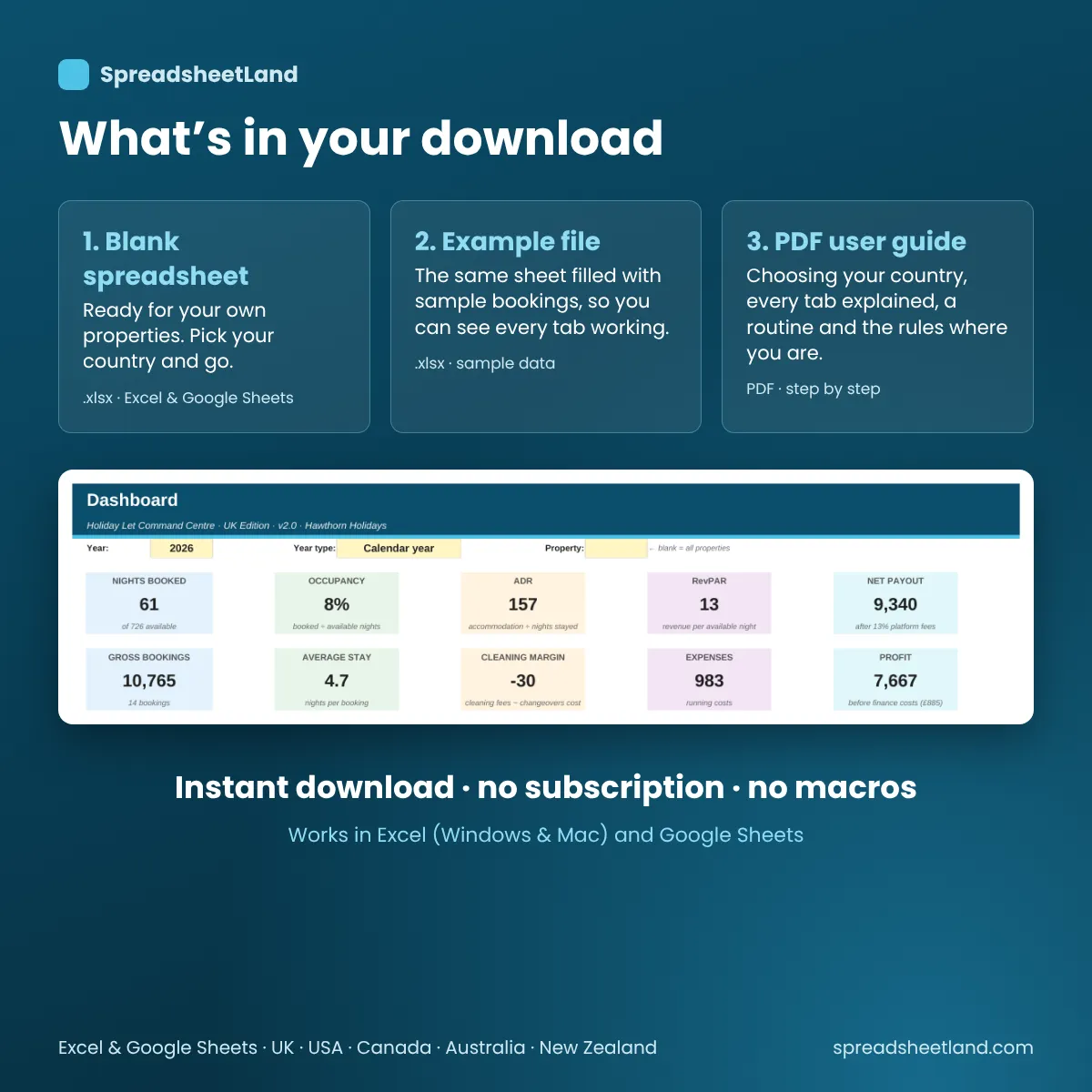
What’s in your download

  • Your blank spreadsheet – ready for your own details (Excel and Google Sheets), with a Country setting for the UK, USA, Canada, Australia and New Zealand
  • A filled-in EXAMPLE copy – the same sheet with two example holiday lets and a year of bookings, so you can see every tab working
  • A full PDF user guide – choosing your country, every tab explained, a simple routine, a worked example, the rules where you are (with official sources), troubleshooting and FAQs

Airbnb, Vrbo, Booking.com and direct bookings – each with different fees and payout dates. This brings every booking, changeover and cost for your holiday lets into one file and shows what you actually made.

Sound Familiar?

  • Not sure what you really earned after every platform took its cut
  • A double booking you only spotted when the second guest messaged
  • Cleaner and linen costs scattered across messages and receipts
  • No idea whether you’re on track for the day-count rules where you are

That’s not a you problem – it’s a missing-system problem.

One Command Centre for Your Short Lets

Log each booking once and the sheet works out nights, platform fees, payouts, occupancy, ADR and RevPAR by property and platform, flags double bookings, lists upcoming changeovers and counts the days you need for your country’s rules.

Pick Your Country

One cell on Settings switches the title, wording, currency, tax year and Day Count test: UK business-rates tests (including Wales and Northern Ireland), the US 14-day / 10% personal-use rule, Canada’s rental and personal split, Australia’s private-use apportioning and New Zealand’s mixed-use 62-day test.

Bonus: See It in Action

Your download includes a fully filled-in example with two holiday lets and a year of bookings.

What’s Inside

  • Dashboard – occupancy, ADR, RevPAR, income by platform and property, upcoming changeovers and charts
  • Bookings – every stay with platform fees, payout and a double-booking alarm
  • Changeovers & Cleaning – cleaner pay and linen cost per changeover
  • Expenses – costs grouped into your country’s categories and tax year
  • Day Count – nights let, available and personal use against your country’s test
  • Properties and Platforms – your homes, cleaning defaults and platform fee rates
  • Settings – country, editable rules, theme
  • Start Here – a plain-English guide built into the workbook

Format

Instant digital download – works in Microsoft Excel, Google Sheets and LibreOffice, on Mac, PC, Chromebook or tablet. No macros, no add-ons, no subscription.

How It Works

  1. Purchase and download the files
  2. Open in Excel, or upload to Google Drive and open with Google Sheets
  3. Pick your country on the Settings tab – wording, currency and rules switch to match
  4. Add your properties and log each booking – everything else updates itself

Please Note

This is a digital product – no physical item will be shipped or posted. Day-count and tax results are estimates to help you keep records, not tax advice. Rules are shown “as of 29 Oct 2026 – check before relying on this” and can be edited in the sheet. For personal/business use only, please don’t resell or share the file.

Questions before you buy? Email hello@spreadsheetland.com – happy to help!
Reviews

There are no reviews yet.

Only logged in customers who have purchased this product may leave a review.