Wedding Budget & Planning Command Centre — All-in-One Vendor, Guest List & Seating Spreadsheet

Original price was: £49.99.Current price is: £27.99.

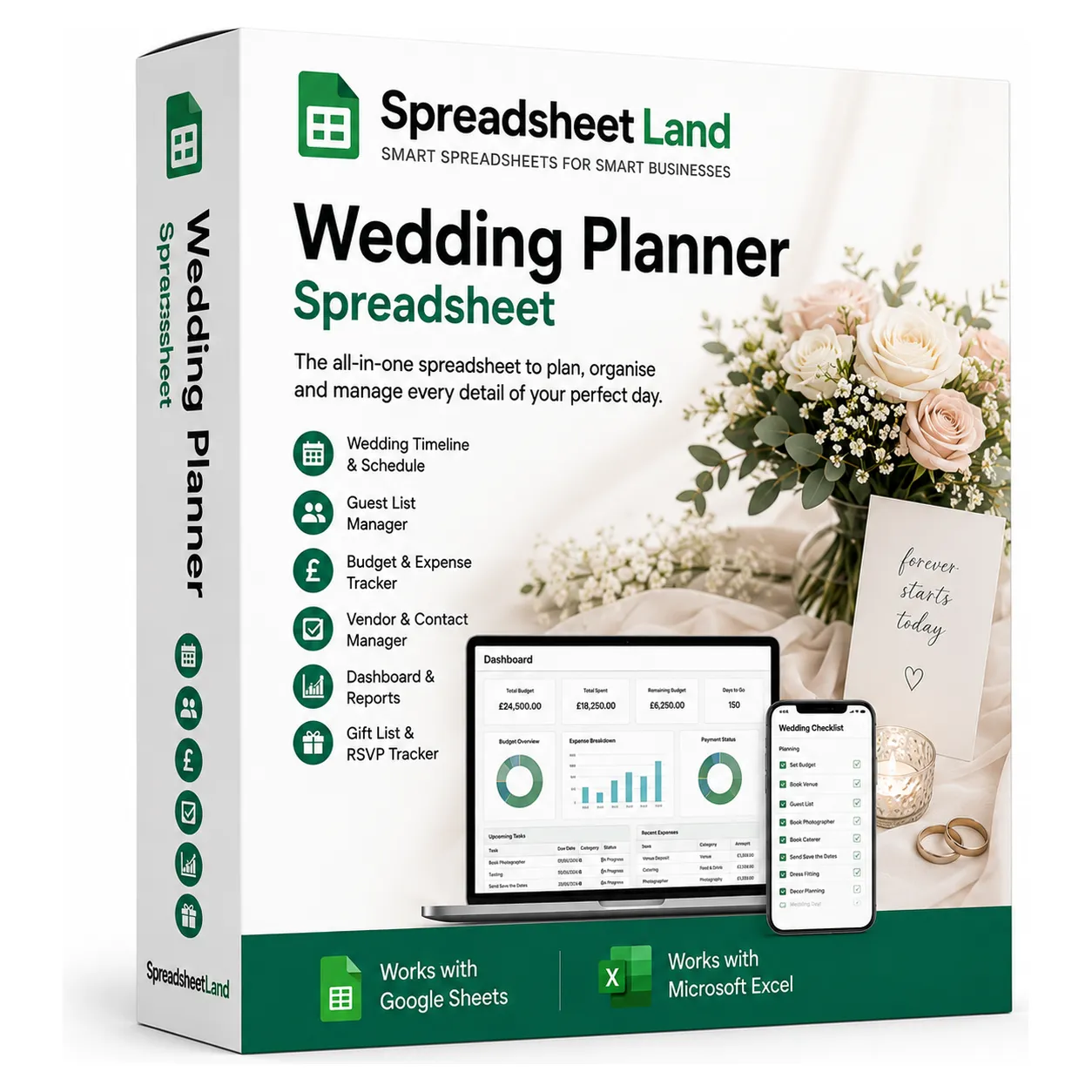
The all-in-one wedding planner spreadsheet: budget tracker, vendor payments, guest list with RSVPs, seating planner and checklist, with a dashboard that updates as you go. Works in Excel and Google Sheets.

Digital download, available immediately. By buying, including with Google Pay or Amazon Pay, you agree to immediate access and that your 14-day right to cancel ends once your download is available. See our Terms and Refund Policy.

BudgetVendorsDepositsGuest listRSVPsMeal choicesSeating planChecklistCountdownSix colour themes
Instant downloadLink straight after checkout and by email
Excel or Google SheetsMac, PC, Chromebook. No macros
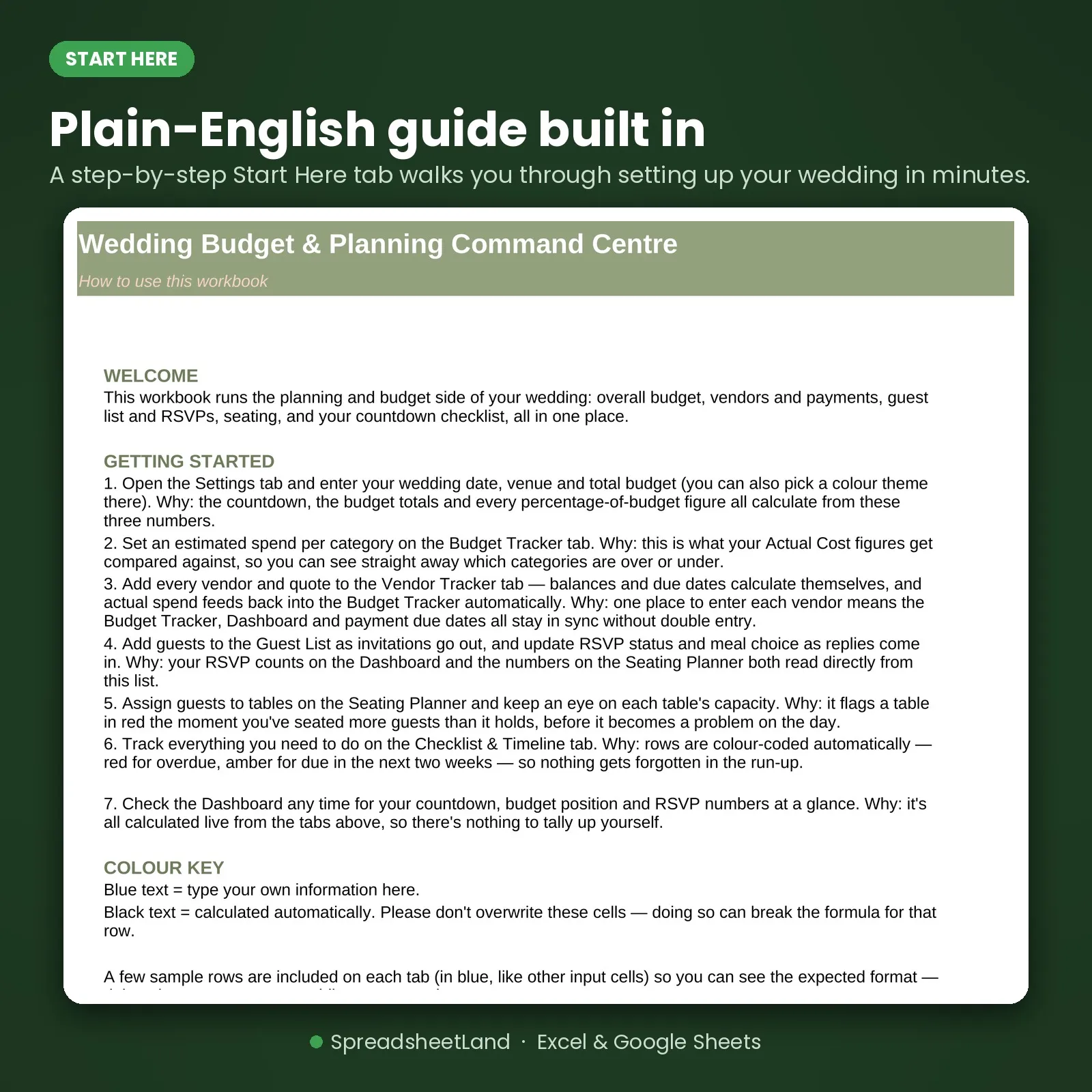
Start Here guide built inPlain-English steps for every tab
Secure checkoutCard, Apple Pay and Google Pay

Sound familiar?

You said yes. Now there’s a spreadsheet’s worth of things to keep track of.

  • No idea if you’re actually on budget until the vendor invoices start landing
  • A guest list split across a spreadsheet, a notes app and a group chat
  • Forgotten which vendors are paid and which still have a balance due
  • A seating chart juggled in your head because moving people on paper means starting again
  • A to-do list that only exists as a vague sense of dread

That’s not a you problem. It’s a missing-system problem.

Why couples love it

One place for every detail of the day.

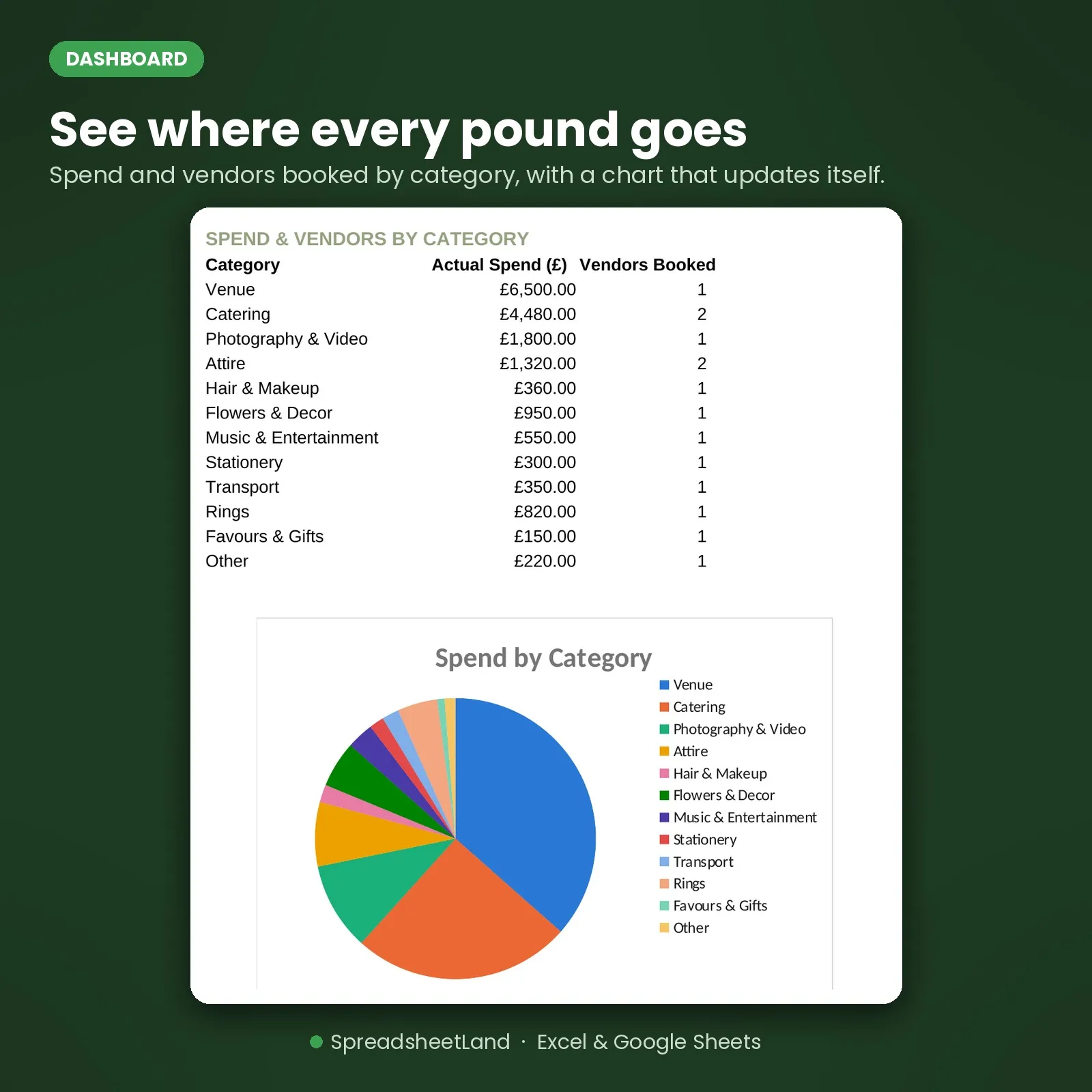
  • Budget vs actual by category, so you know where every pound is going
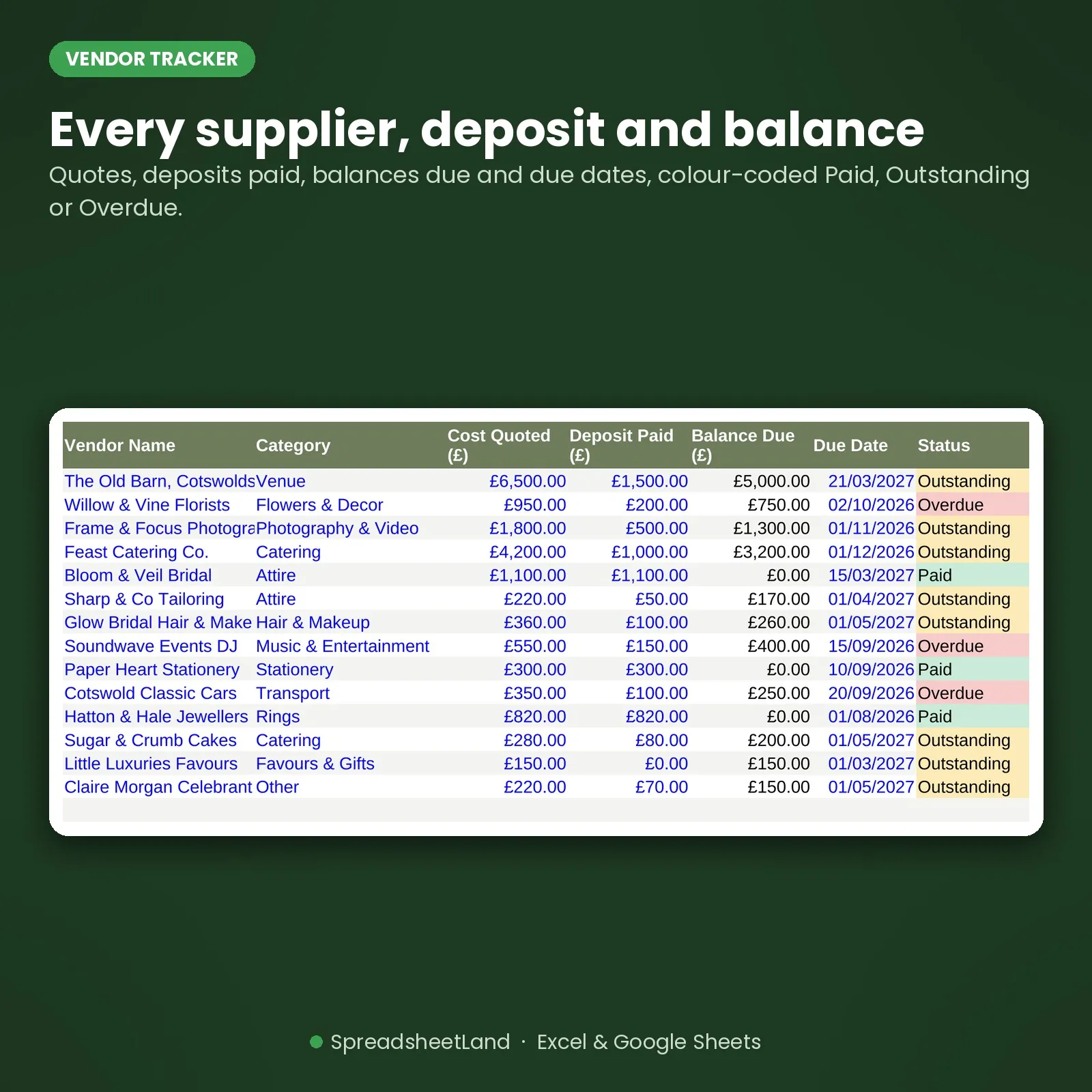
  • Every vendor, deposit and balance colour-coded Paid, Outstanding or Overdue
  • Guest list with RSVPs and meal choices, with a live count
  • A seating planner that flags any table you’ve over-filled
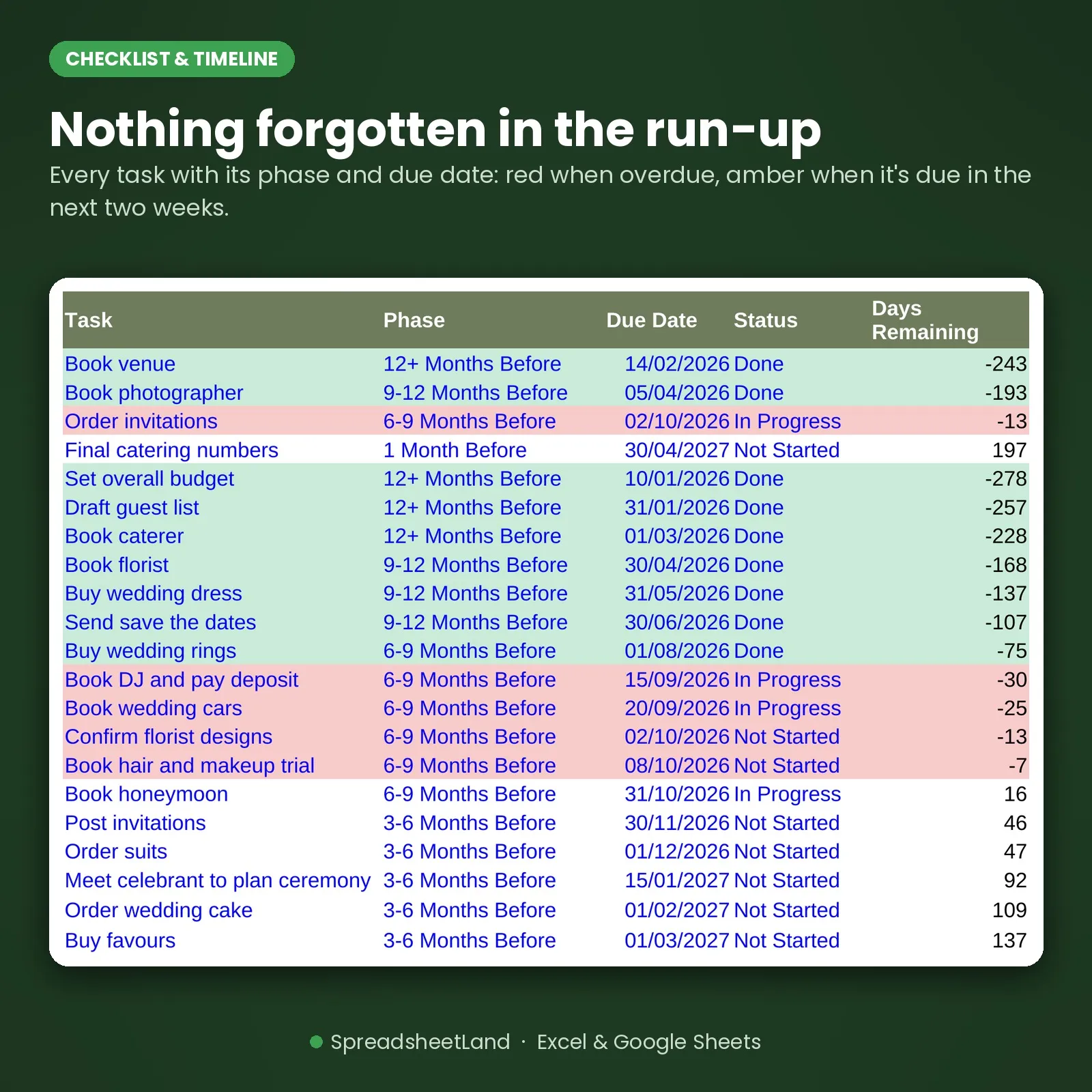
  • A checklist and countdown that turns red when a task is overdue
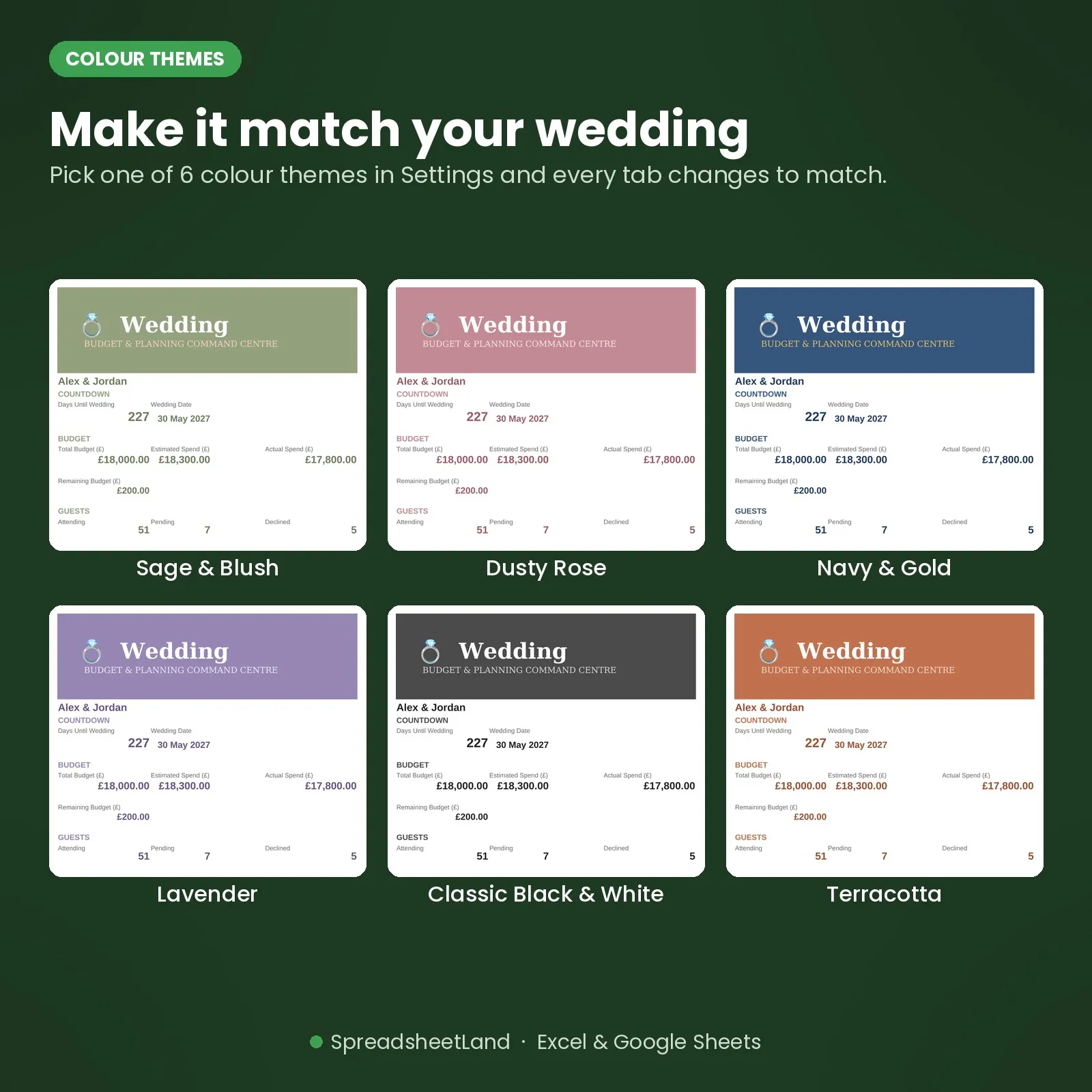
  • Six colour themes, from Sage & Blush to Navy & Gold

Where the money goes

£18,000 budget. Where is it all going?

From the filled-in example wedding that comes with your download. Every category, estimated against actual.

£18,000Example: Alex & Jordan’s total budget
Venue£6,500
Catering£4,480
Photography & video£1,800
Attire£1,320
Flowers & decor£950
Everything else£2,750
Still to spend£200

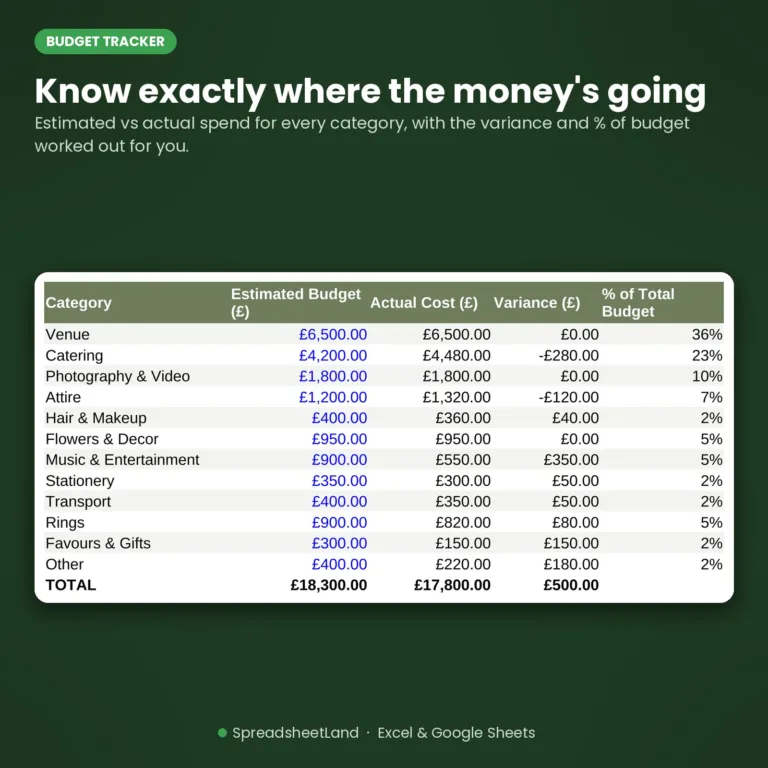
Figures from the example file. Catering came in £280 over its estimate, and the Budget Tracker shows it straight away.

£280

Catering over budget in the example, spotted the day the quote landed

vs
£27.99

The whole planner, once, to keep

Spot one overspend early and it has paid for itself many times over. Buy now, instant download

How it fits together

Add a vendor once. The rest updates itself.

  1. VendorsEvery quote, deposit and balance due
  2. BudgetActual spend fills in by category
  3. GuestsRSVPs and meal choices counted
  4. SeatingTables flag when they’re over-filled
  5. DashboardCountdown, budget and RSVPs at a glance
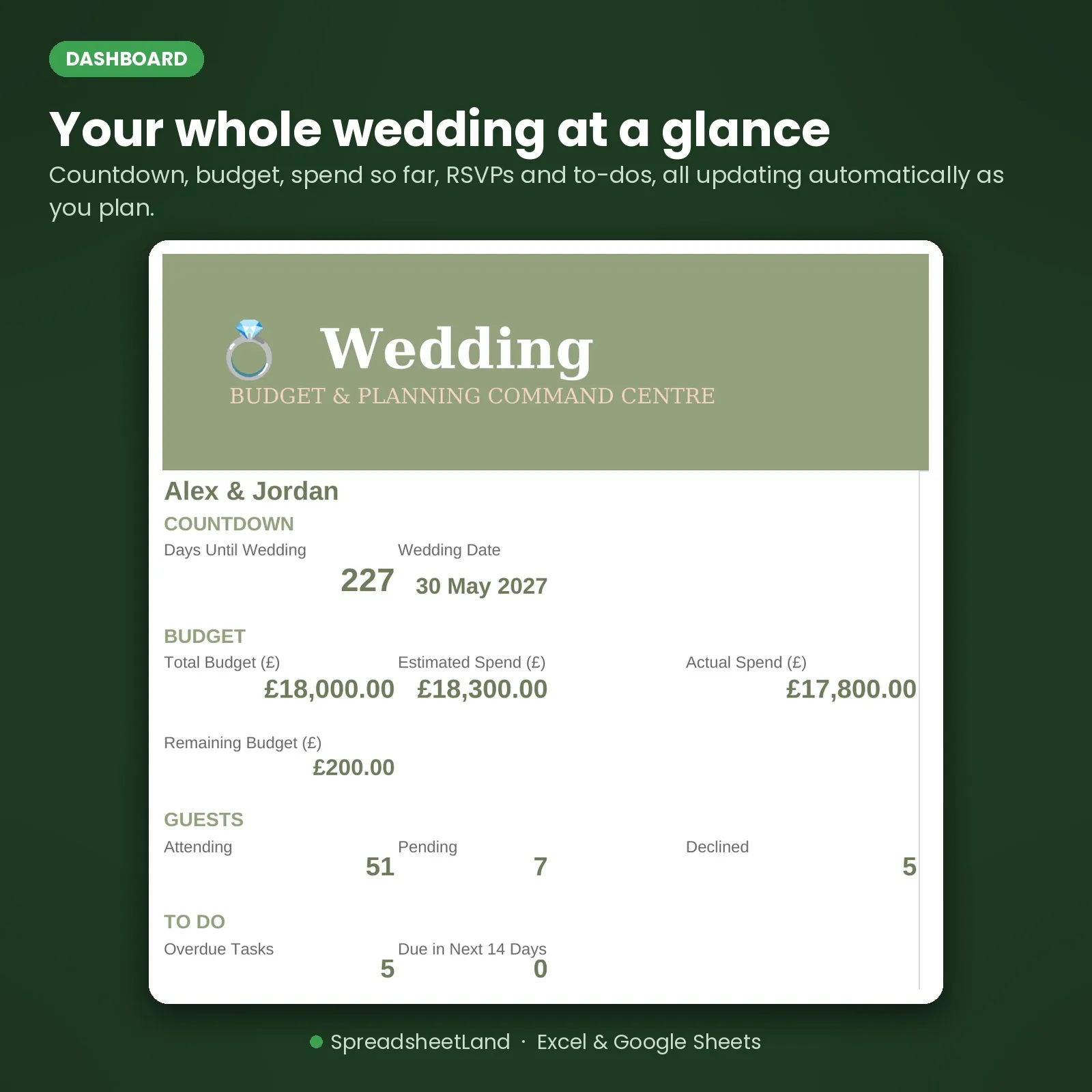
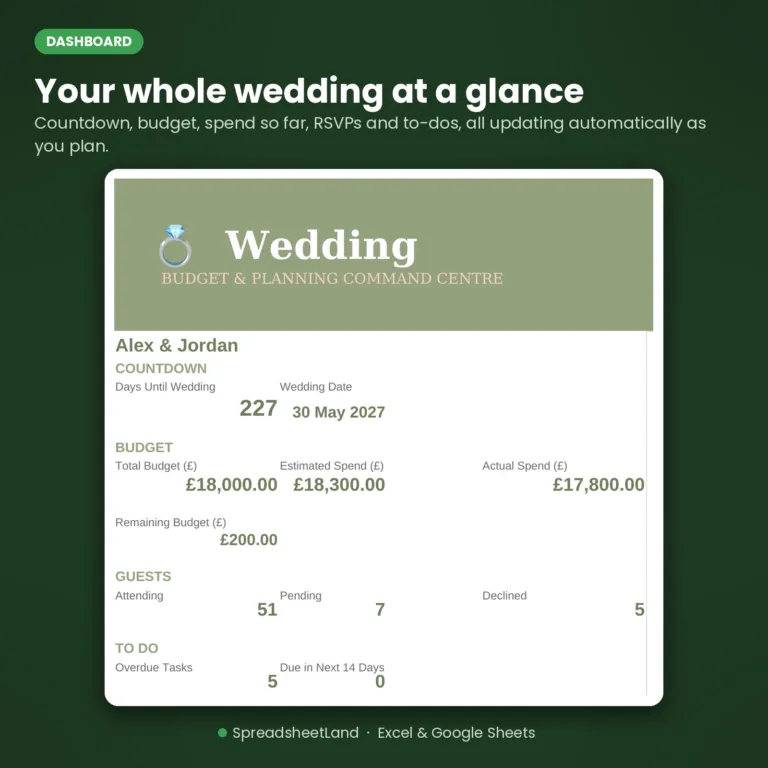
Wedding planner dashboard with countdown, budget and RSVP numbers

The dashboard

Your whole wedding on one screen.

Real figures from the filled-in example wedding that comes with your download.

Total budget£18,000Set in Settings
Actual spend£17,800£200 left
Guests attending517 still to reply
Overdue tasks5Shown in red

What’s inside

Everything in one file. Click through it.

Dashboard

Your countdown to the big day, budget position, RSVP numbers and overdue to-dos, all at a glance.

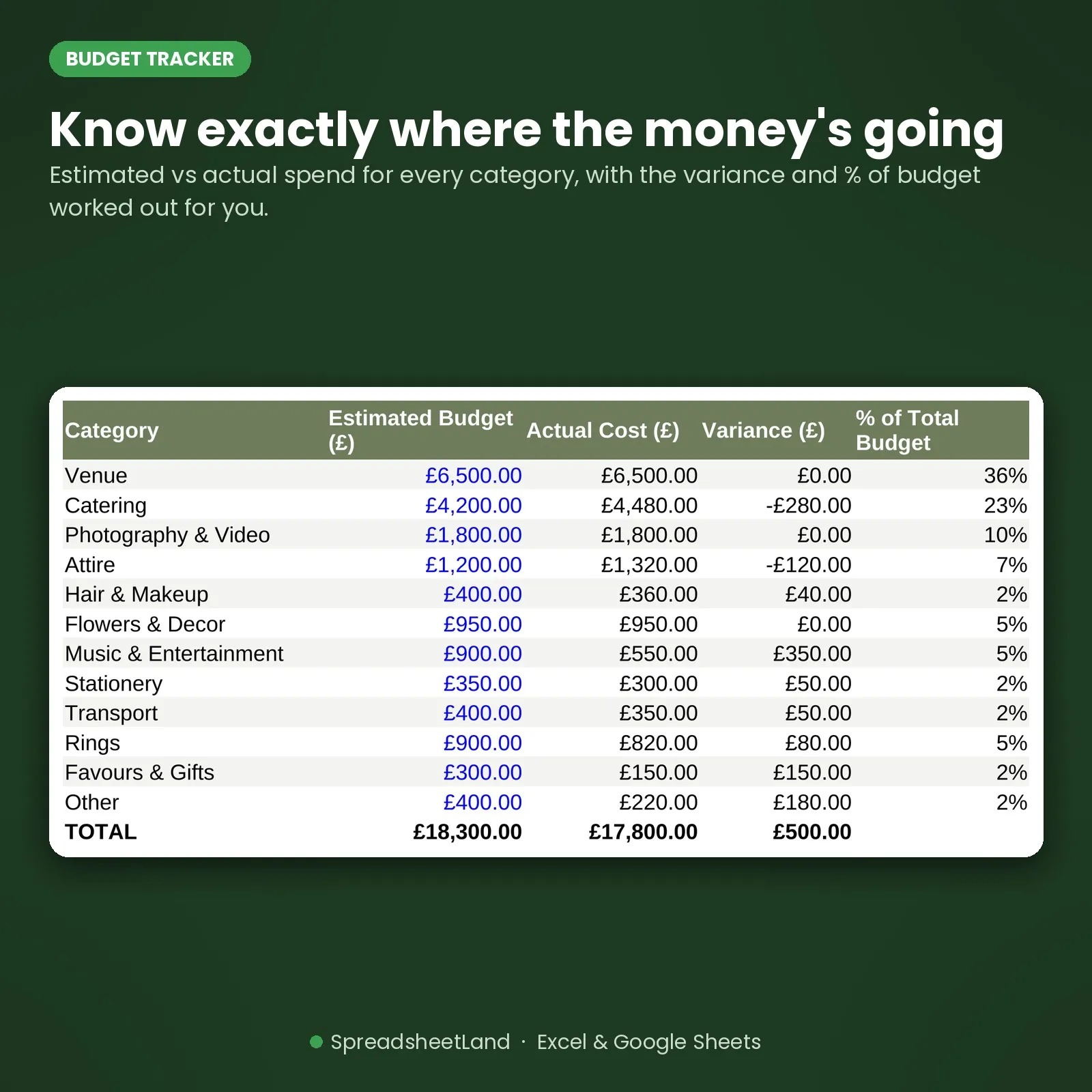
Budget tracker with estimated against actual spend

Budget Tracker

Know you’re on budget, category by category.

  • Estimated against actual for every category
  • Over-budget lines show up straight away
  • Actual spend fills in from your vendors
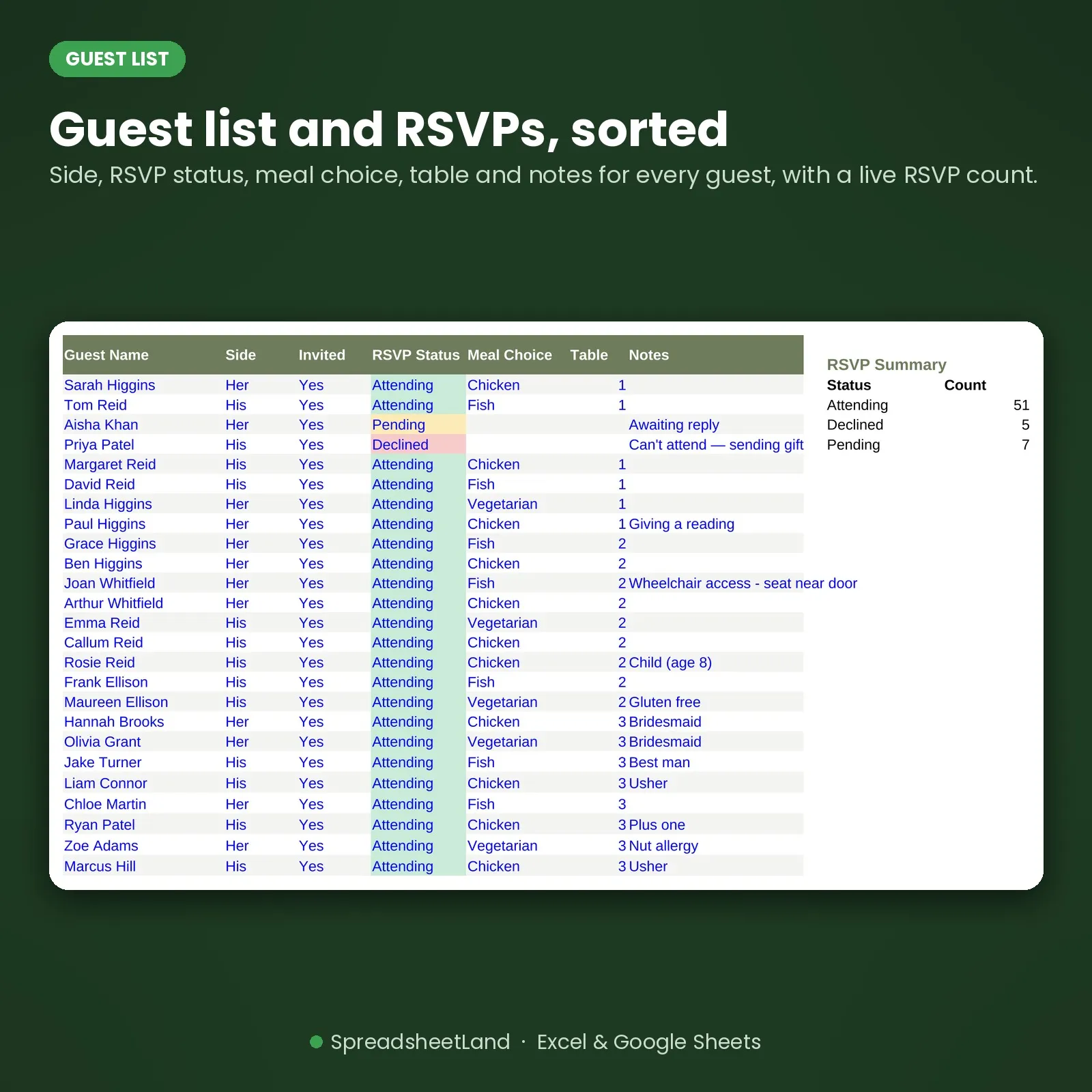
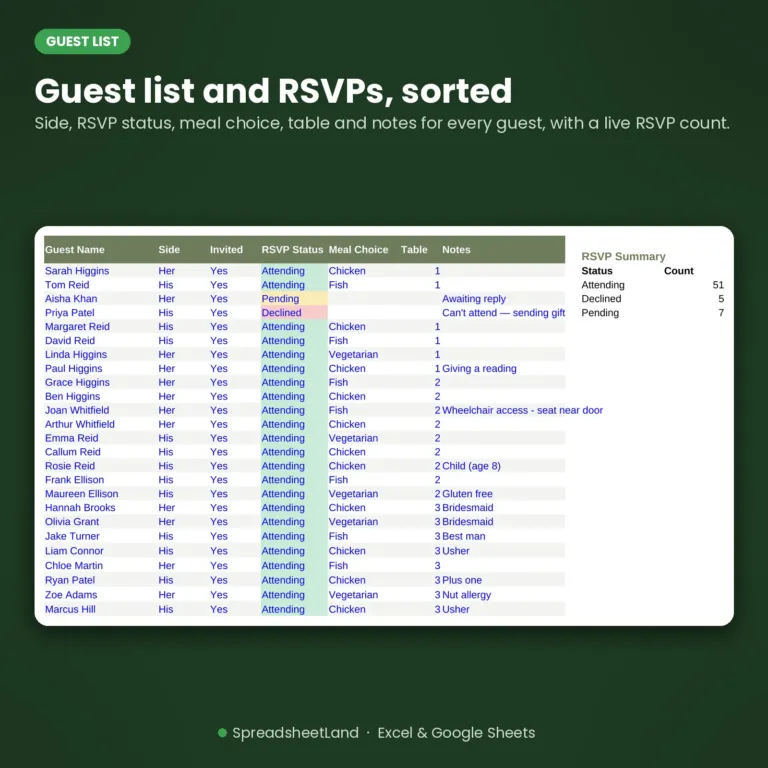
Guest list with RSVPs and meal choices

Guest List

RSVPs and meal choices, counted for you.

  • Attending, pending and declined, counted live
  • Meal choices and notes for the caterer
  • Tables feed straight into the seating planner
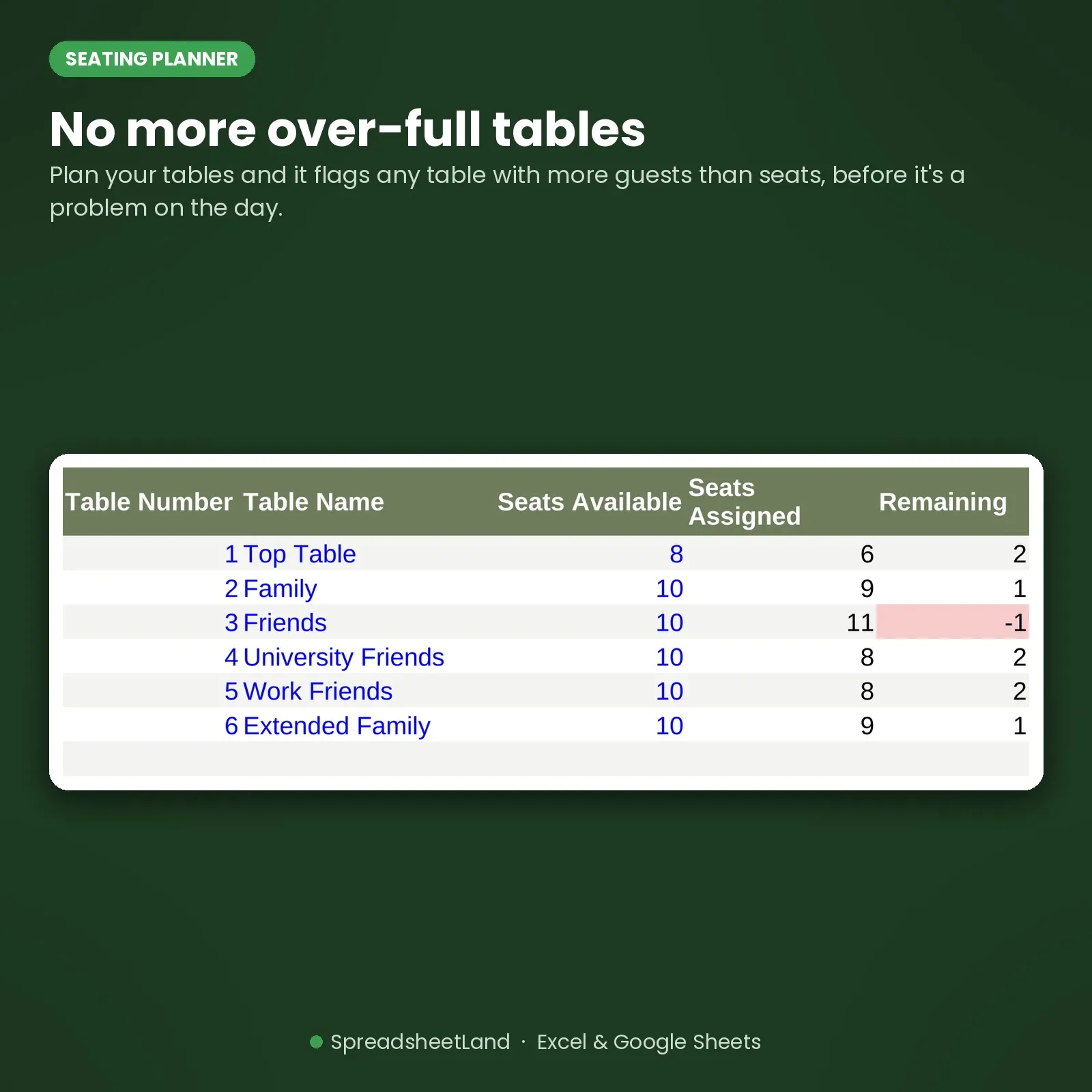
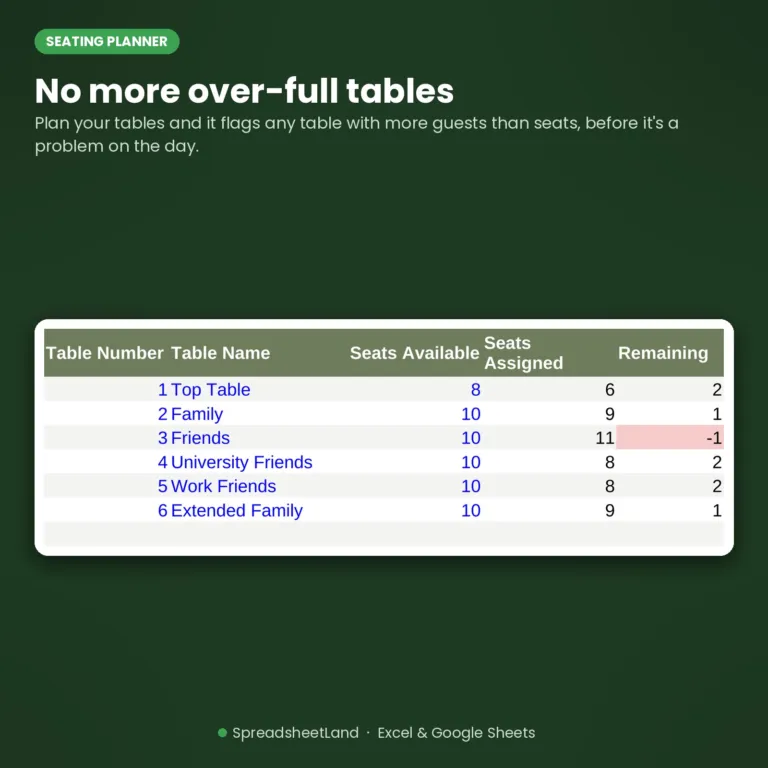
Seating planner that flags over-filled tables

Seating Planner

Move people around without starting again.

  • Seats available, assigned and remaining per table
  • Over-filled tables flag in red
  • No more redrawing the plan on paper

Before and after

From guessing to knowing.

Without it

  • Quotes in your email
  • Guests in three different apps
  • Deposits you can’t remember paying
  • A seating plan on the back of an envelope
  • A to-do list in your head

With the planner

  • Every vendor and balance in one list
  • One guest list with RSVPs and meals
  • Paid, Outstanding or Overdue at a glance
  • A seating planner that warns you
  • A checklist that turns red when it’s late

What you get

Everything in one download.

The blank plannerReady for your big day
A filled-in exampleA sample couple, vendors, guests and checklist
Start Here guideBuilt into the workbook, one step per tab
Six colour themesSage & Blush, Dusty Rose, Navy & Gold and more
Works everywhereExcel or Google Sheets, so you can share it
Help if you’re stuckMessage me any time and I’ll help you set up

Set up in an evening

Four steps.

  1. Buy and downloadThe link arrives straight away
  2. Open itIn Excel, or upload to Google Sheets to share
  3. Add your date and budgetPick a colour theme in Settings
  4. Add vendors and guestsEverything else updates itself

Made for

  • Couples planning their own wedding
  • Anyone who wants the budget and guest list in one place
  • Couples who want to share one plan between them

Not for

  • Professional wedding planners running many weddings
  • Sending invitations or collecting RSVPs online
  • Anyone who wants a paper planner

Works in Excel and free Google Sheets, so you can both work on it. Version 2.0, updated October 2026.

Before you buy

Questions

Do I need Microsoft Excel?

No. It works in Microsoft Excel, or free in Google Sheets.

Is it a subscription?

No. It is a one-off payment and the file is yours to keep. There are no monthly fees.

I'm not good with spreadsheets. Is this for me?

Yes. You just type into the input cells and the totals, charts and dashboard update themselves. There are no formulas to write, and the instructions in the file walk you through it.

Can I see it before I buy?

Yes. Look through the screenshots above. Your download also includes a second copy filled in with example data, so you can see exactly how it works before adding your own.

Does it work on a Mac, iPad or phone?

Yes on a Mac: use Excel for Mac, or open it free in Google Sheets in your web browser. On an iPad or phone you can open it in the free Excel or Google Sheets app to check and update it, but a computer is easier for setting it up.

Can I get a refund?

Because it is an instant digital download, I can’t offer a refund once the file has been downloaded. If the file is faulty and I can’t fix it, you were charged twice, or you received the wrong product, I will put it right or refund you. See the Refund Policy. This doesn’t affect your statutory rights.

How do I get my file?

It is an instant digital download. You will get a download link straight after checkout, and by email.

What if I get stuck?

Message me any time and I will help you get set up.

Ready when you are

Plan the day, not the paperwork.

£27.99 once. Download it tonight and have your budget set up by bedtime.

Buy now, instant download

More wedding planning spreadsheets →

Full product details, tabs list and notes

Description

What’s in your download

  • Your blank spreadsheet – ready for your own details (Excel and Google Sheets)
  • A filled-in DEMO copy – the same sheet with sample data, so you can see every tab working
  • A full PDF user guide – set-up, every tab explained, a simple routine, the HMRC and UK rules that apply, troubleshooting and FAQs

Stop juggling five different documents for your wedding. This is the problem solver: one spreadsheet that runs your budget, vendors, guest list, seating plan and countdown checklist, so you always know exactly where things stand.

Sound Familiar?

  • No idea if you’re actually on budget until the vendor invoices start landing
  • A guest list split across a spreadsheet, a notes app and a group chat
  • Forgotten which vendors are paid and which still have a balance due
  • A seating chart juggled in your head because moving people on paper means starting again
  • A to-do list that only exists as a vague sense of dread

None of that is a “you” problem, it’s a missing system problem. This template fixes it.

One Wedding Planner Spreadsheet for Everything

The Wedding Budget & Planning Command Centre puts your budget, vendors, guest list, seating and checklist all into one spreadsheet that does the maths for you. No formulas to write, just fill in the coloured cells.

Bonus: See It in Action

Your download includes a second file too – a fully filled-in example with a sample couple, vendors, guests and a seating plan already entered, so you can see exactly how everything looks and works before you add your own details.

What’s Inside the Wedding Planner Spreadsheet

  • Dashboard — your countdown to the big day, budget position, RSVP numbers and overdue to-dos, all at a glance.
  • Vendor Tracker — every vendor, quote, deposit and balance due, colour-coded Paid / Outstanding / Overdue.
  • Budget Tracker — estimated vs actual spend by category (venue, catering, photography, attire and more), with variance and % of budget calculated automatically, plus a bar chart comparing estimate to actual.
  • Guest List — names, side, invited status, RSVP, meal choice and table, with a live RSVP summary count.
  • Seating Planner — assign guests to tables and it flags any table you’ve over-filled, before it becomes a problem on the day.
  • Checklist & Timeline — every task with a phase and due date, colour-coded red for overdue and amber for due in the next two weeks.
  • Start Here guide — a plain-English walkthrough of every tab, built into the workbook.
  • 6 colour themes — pick Sage & Blush, Dusty Rose, Navy & Gold, Lavender, Classic Black & White or Terracotta in Settings and every tab, including the Dashboard banner, changes to match.

Every number flows automatically — log a vendor once and the Budget Tracker and Dashboard update themselves; add a guest once and your RSVP counts and seating numbers stay in sync. No macros, no add-ons, no subscription.

Format

Instant digital download – works in Microsoft Excel, Google Sheets and LibreOffice, on Mac, PC, Chromebook or tablet. Nothing to install.

Current version: 2.0 (updated October 2026)

How It Works

  1. Purchase and download the file
  2. Open it in Excel or upload it to Google Sheets
  3. Follow the Start Here tab to add your wedding date, venue and budget
  4. Start adding vendors and guests – everything else updates itself

Please Note

This is a digital product – no physical item will be shipped or posted. For personal use only, please don’t resell or share the file.

Questions before you buy? Message me any time, happy to help!

Wedding Planner Spreadsheet FAQ

Do I need Microsoft Excel?

No. It works in Microsoft Excel, or free in Google Sheets.

Is it a subscription?

No. It is a one-off payment and the file is yours to keep. There are no monthly fees.

I’m not good with spreadsheets. Is this for me?

Yes. You just type into the input cells and the totals, charts and dashboard update themselves. There are no formulas to write, and the instructions in the file walk you through it.

Can I see it before I buy?

Yes. Look through the screenshots above. Your download also includes a second copy filled in with example data, so you can see exactly how it works before adding your own.

Does it work on a Mac, iPad or phone?

Yes on a Mac: use Excel for Mac, or open it free in Google Sheets in your web browser. On an iPad or phone you can open it in the free Excel or Google Sheets app to check and update it, but a computer is easier for setting it up.

Can I get a refund?

Because it is an instant digital download, I can’t offer a refund once the file has been downloaded. If the file is faulty and I can’t fix it, you were charged twice, or you received the wrong product, I will put it right or refund you. See the Refund Policy. This doesn’t affect your statutory rights.

How do I get my file?

It is an instant digital download. You will get a download link straight after checkout, and by email.

What if I get stuck?

Message me any time and I will help you get set up.
Reviews

There are no reviews yet.

Only logged in customers who have purchased this product may leave a review.