CIS Tracker for Subcontractors — CIS Deductions · Tax Refund Estimate Spreadsheet

£24.99

Build your trade bundle

Tick the trade sheets you want. The discount is worked out here and added in your basket automatically.

Any 3 – 15% offAny 5 – 25% off
  • £24.99
  • £29.99
  • £29.99
  • £24.99
  • £19.99
  • £19.99
  • £19.99

Track every CIS deduction taken from your pay – and spot the wrong ones. Labour and materials kept separate, monthly statements checked off and a year-end figure for Self Assessment. Works in Excel & Google Sheets. No macros, no subscription. Instant download: blank sheet, filled-in example and a full PDF guide.

Digital download, available immediately. By buying, including with Google Pay or Amazon Pay, you agree to immediate access and that your 14-day right to cancel ends once your download is available. See our Terms and Refund Policy.

Category:
PlumbersElectriciansBuildersJoinersRoofersDecoratorsLandscapersPlasterersTilersHeating engineers
Instant downloadLink straight after checkout and by email
Excel or Google SheetsMac, PC, Chromebook. No macros
Start Here guide built inPlain-English steps for every tab
Secure checkoutCard, Apple Pay and Google Pay

Sound familiar?

20% gone. Was it taken right?

  • Contractors deduct CIS on materials, or at the wrong rate
  • Missing monthly deduction statements at tax-return time
  • No idea what refund to expect after Self Assessment

That’s not a you problem. It’s a missing-system problem.

Why trades love it

Every deduction checked. Your refund estimated.

  • Labour and materials kept apart
  • Over-deductions flagged
  • Monthly statements ticked off
  • Expenses and mileage logged
  • Year End figures for your return
  • Refund estimate before you file

How it fits together

Log each invoice. The checks do the rest.

  1. ContractorsWho pays you
  2. PaymentsEach invoice
  3. StatementsEvery month
  4. ExpensesCosts and miles
  5. Year EndYour figures
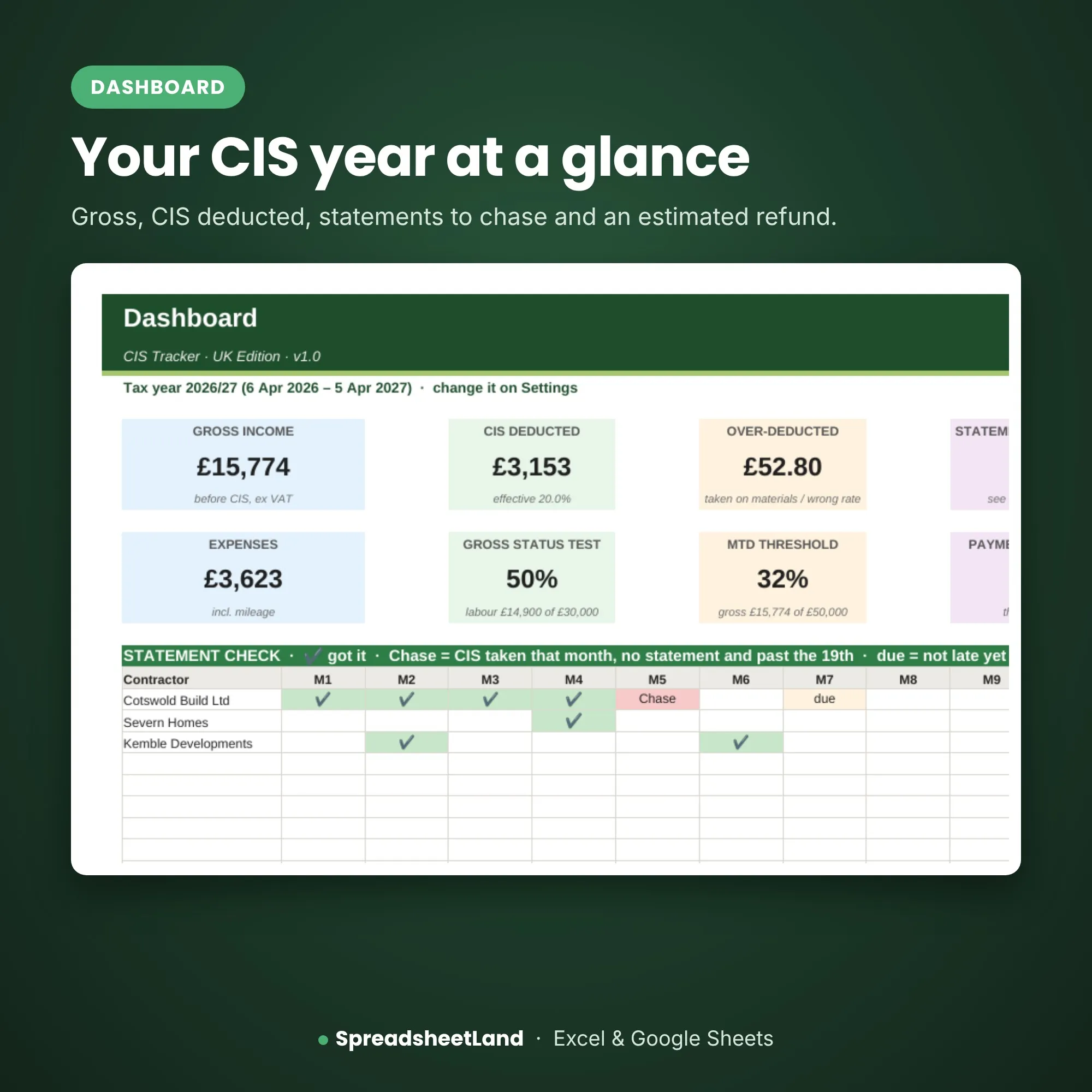
CIS Tracker – the dashboard

The dashboard

Your CIS year at a glance.

Gross, CIS taken, statements to chase and a refund estimate.

Rates20/30/0CIS rates covered
Tax months126th to the 5th
Fees£0One payment, yours to keep
Monthly fees£0One payment, yours to keep

What’s inside

9 tabs, one file. Click through them.

Start Here

What each colour means and a quick guide to every tab.

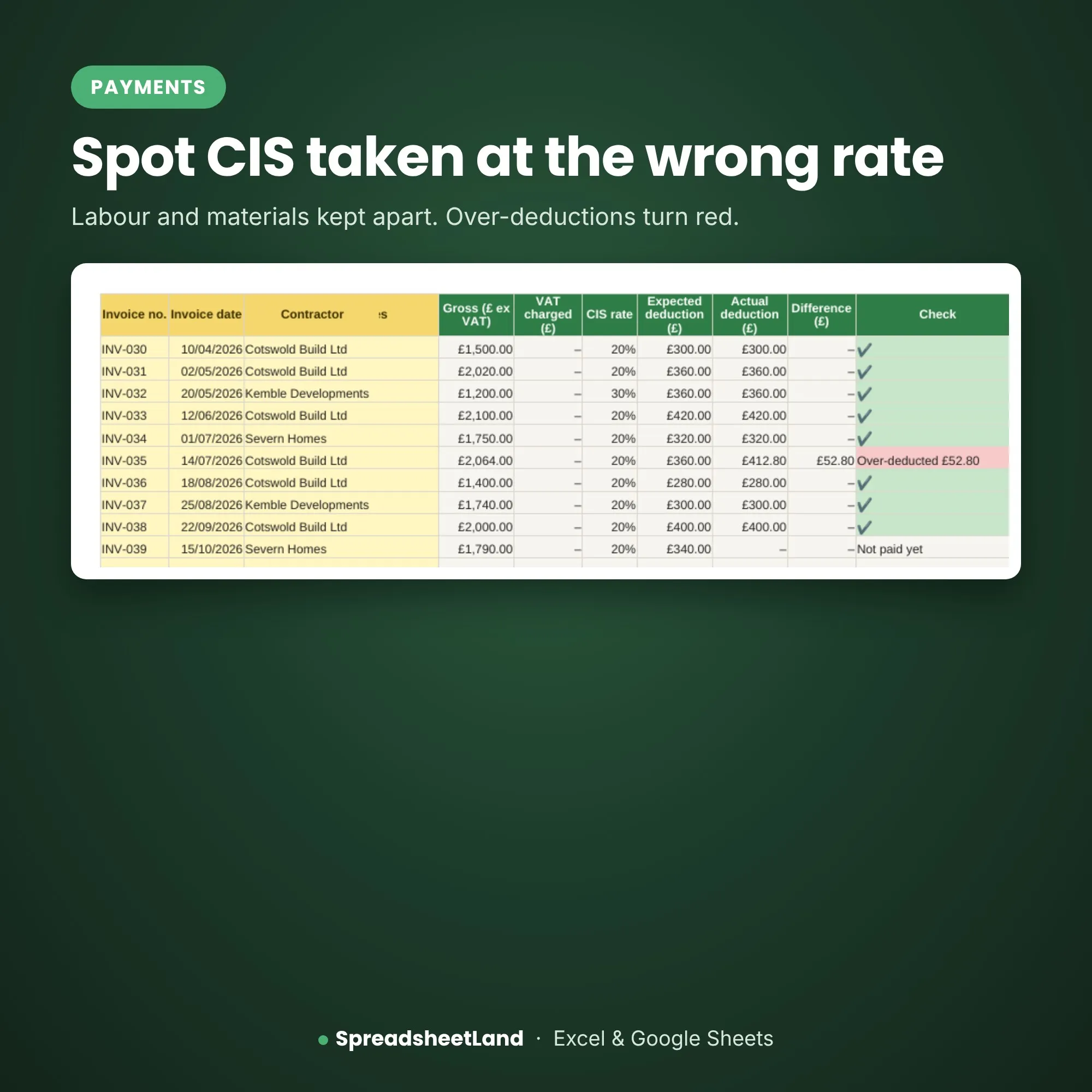
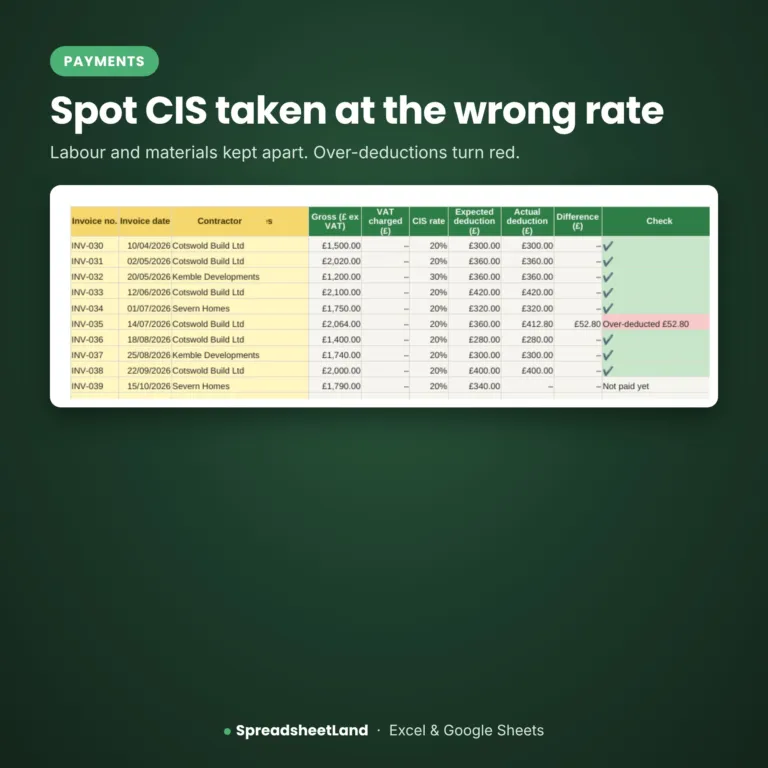
Spot CIS taken at the wrong rate

Payments

Labour and materials kept apart.

  • CIS on labour only
  • Over-deductions turn red
  • Statements matched

Before and after

From guessing to knowing.

Without it

  • Statements lost
  • CIS taken on materials
  • Refund unknown
  • Panic in January

With the sheet

  • Every statement ticked off
  • Over-deductions caught
  • Refund estimated
  • Figures ready for your return

What you get

Everything in one download.

The CIS TrackerReady for your business
A filled-in DEMO copySee it working before you add your own
Full PDF user guideSet-up and every tab explained
Colour themesPick one to match your business
Works everywhereExcel or Google Sheets, Mac or PC
Help if you’re stuckEmail me and I’ll help you set up

Up and running in an evening

Four steps.

  1. Buy and downloadThe link arrives straight away
  2. Open itIn Excel, or upload it to Google Sheets
  3. Check the DEMO and guideThen fill in your blank copy
  4. Start using itEverything else works itself out

Made for

  • UK tradespeople and small trade firms
  • Owners who do the paperwork themselves
  • Anyone who’d rather not pay monthly for software

Not for

  • Large firms with their own systems
  • Anyone wanting an app or online system
  • Tax, legal or safety advice

A record-keeping spreadsheet with estimates, not tax advice. It does not file anything with HMRC.

Before you buy

Questions

Is this for contractors or subcontractors?

For subcontractors who have CIS taken from their pay. If you pay subcontractors, see our Subcontractor Tracker.

Does it file anything with HMRC?

No. It keeps your records and works out estimates. You still do your Self Assessment yourself or with your accountant.

Is the refund exact?

No – it is an estimate to help you plan. It is not tax advice.

Do I need Microsoft Excel?

No. It works in Microsoft Excel, or free in Google Sheets.

Is it a subscription?

No. It is a one-off payment and the file is yours to keep. There are no monthly fees.

I’m not good with spreadsheets. Is this for me?

Yes. You type into the yellow boxes and everything else works itself out. There are no formulas to write, and the PDF guide walks you through it.

Can I see it before I buy?

Yes. Look through the screenshots above. Your download includes a filled-in DEMO copy and a full PDF guide as well as the blank spreadsheet.

Does it work on a Mac, iPad or phone?

Yes on a Mac: use Excel for Mac, or open it free in Google Sheets in your web browser. On an iPad or phone you can open it in the free Excel or Google Sheets app, but a computer is easier for setting it up.

Can I get a refund?

Because it is an instant digital download, I can’t offer a refund once the file has been downloaded. If the file is faulty and I can’t fix it, you were charged twice, or you received the wrong product, I will put it right or refund you. See the Refund Policy. This doesn’t affect your statutory rights.

How do I get my file?

It is an instant digital download. You will get a download link straight after checkout, and by email.

What if I get stuck?

Email hello@spreadsheetland.com and I will help you get set up.
Ready when you are

Get back what you’re owed.

£24.99 once. Download it now and log this year’s payments.

Buy now, instant download

More spreadsheets for trades →

Full product details, tabs list and notes

Description

Sound familiar?

  • Contractors deduct CIS on materials, or at the wrong rate.
  • Missing monthly deduction statements at tax-return time.
  • No idea what refund to expect after Self Assessment.

What the CIS Tracker does

Log every invoice with labour and materials separately, the date you were paid and what reached your bank. The sheet works out the right CIS deduction on labour only and flags any over-deduction. Tick off each monthly statement – the Dashboard shows which are missing. Add expenses and mileage, and the Year End page gives your figures for Self Assessment with an estimated refund.

What’s inside

  • Start Here – what each colour means and a quick guide to every tab
  • Dashboard – deductions this tax year, missing statements and over-deductions
  • Payments – one row per invoice: labour, materials, date paid and amount received
  • Statements – each monthly CIS payment and deduction statement
  • Contractors – who pays you and the rate they deduct
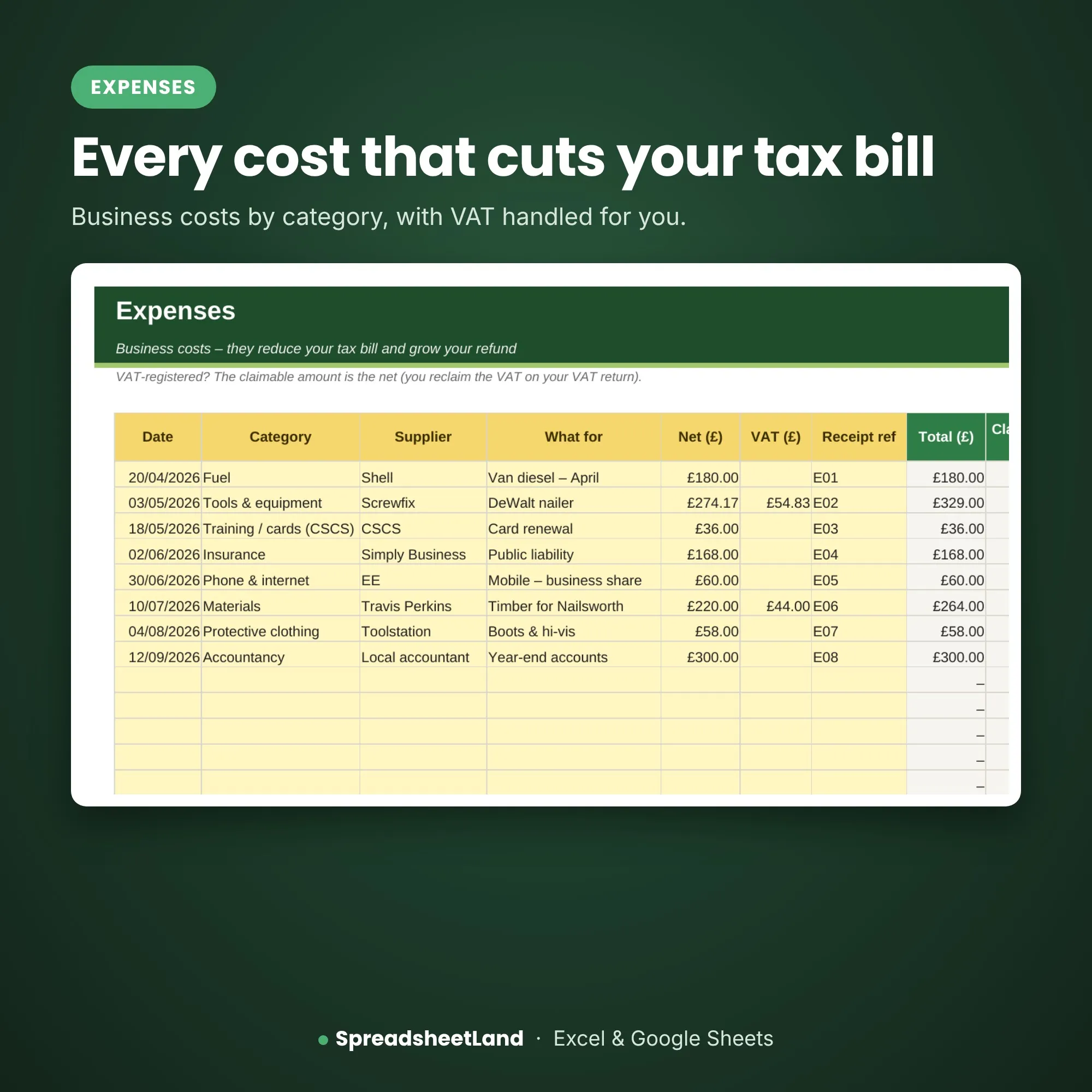
  • Expenses – business costs for your tax return
  • Mileage – business journeys at HMRC rates
  • Year End – your figures for Self Assessment and an estimated refund
  • Settings – your details, VAT status, tax year and rates

Format

  • Your blank spreadsheet (.xlsx, UK edition), ready for your business
  • A filled-in DEMO copy, so you can see every tab working before you start
  • A full PDF user guide: set-up, every tab explained, a routine, the rules that apply and answers to common questions
  • Works in Microsoft Excel (Windows and Mac) and Google Sheets
  • No macros, nothing to install, no subscription
  • Yellow boxes are for you to fill in; the rest works itself out

Mix & match: pick any of our trade sheets – any 3 for 15% off, any 5 for 25% off. The discount is added in your basket.

How it works

  1. Buy and download the file straight away.
  2. Open it in Excel, or upload it to Google Sheets.
  3. Open the example copy and the PDF guide to see how it works, then fill in Settings on your blank copy and start typing your own.

Please note

This is a digital product — nothing will be posted. A record-keeping spreadsheet with estimates, not tax advice. It does not file anything with HMRC. For use in your own business only — please don’t resell or share the file.

Questions before you buy? Email hello@spreadsheetland.com — happy to help!

CIS Tracker FAQ

Is this for contractors or subcontractors?

For subcontractors who have CIS taken from their pay. If you pay subcontractors, see our Subcontractor Tracker.

Does it file anything with HMRC?

No. It keeps your records and works out estimates. You still do your Self Assessment yourself or with your accountant.

Is the refund exact?

No – it is an estimate to help you plan. It is not tax advice.

Do I need Microsoft Excel?

No. It works in Microsoft Excel, or free in Google Sheets.

Is it a subscription?

No. It is a one-off payment and the file is yours to keep. There are no monthly fees.

I’m not good with spreadsheets. Is this for me?

Yes. You type into the yellow boxes and everything else works itself out. There are no formulas to write, and the PDF guide walks you through it.

Can I see it before I buy?

Yes. Look through the screenshots above. Your download includes a filled-in DEMO copy and a full PDF guide as well as the blank spreadsheet.

Does it work on a Mac, iPad or phone?

Yes on a Mac: use Excel for Mac, or open it free in Google Sheets in your web browser. On an iPad or phone you can open it in the free Excel or Google Sheets app, but a computer is easier for setting it up.

Can I get a refund?

Because it is an instant digital download, I can’t offer a refund once the file has been downloaded. If the file is faulty and I can’t fix it, you were charged twice, or you received the wrong product, I will put it right or refund you. See the Refund Policy. This doesn’t affect your statutory rights.

How do I get my file?

It is an instant digital download. You will get a download link straight after checkout, and by email.

What if I get stuck?

Email hello@spreadsheetland.com and I will help you get set up.

Reviews

There are no reviews yet.

Only logged in customers who have purchased this product may leave a review.